Breaking News

SAMA Introduces the S32 WOOD, a Compact M-ATX Case Bundled with an 80 PLUS Gold PSU Thypoch Completes Simera-C Cine Prime Lineup with New 100mm T1.9 Lens CORSAIR Launches the RM1200e Power Supply with Built-in PinProtect GPU Overcurrent Protection and Platinum-certified Efficiency CORSAIR Changes the Game with PureVector, a Science-Based Personalized Aiming Technology, Launching Exclusively in the SABRE v3 PRO PureVector Mouse Series AMD FSR Upscaling 4.1 Boosts Frames and Image Quality on More Devices

logo

  • Share Us
    • Facebook
    • Twitter
  • Home
  • Home
  • News
  • Reviews
  • Essays
  • About
    • Submit News

    • Contact Us
    • Privacy

    • Promotion
    • Advertise

    • RSS Feed

Search form

Kingston HyperX 120GB SSD review

Feb 28,2012 0

6. Benchmarks - page 4


Review Pages

1. Features
2. The drive
3. Benchmarks - page 1
4. Benchmarks - page 2
5. Benchmarks - page 3
6. Benchmarks - page 4
7. Summary


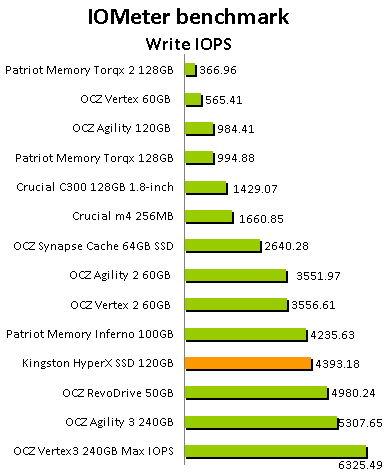
We proceed to IOMeter benchmark. Iometer is run by using workstation and database patterns for queue depths (outstanding I/Os) of two and 32, representing very light and moderate loads. Iometer is both a workload generator (that is, it performs I/O operations in order to stress the system) and a measurement tool (that is, it examines and records the performance of its I/O operations and their impact on the system). The app's ability to bombard drives with an escalating number of concurrent IO requests also does a nice job of simulating the sort of demanding multi-user environments that are common in enterprise applications. It can be used for measurement of the performance of an SSD. We run the IOMeter tests using the Xtreme Benchmark template .

With just 13309.68 combined IOPS, the HyperX 120GB SSD is well positioned among the good performers , as you see below:


The next benchmark is the Anvil Pro, an ‘all inclusive’ storage utility. The software is tests transfer speeds as well as IOPS  The IOPS tests can be configurable with preset testing scenarios for read, write and mixed IO. 

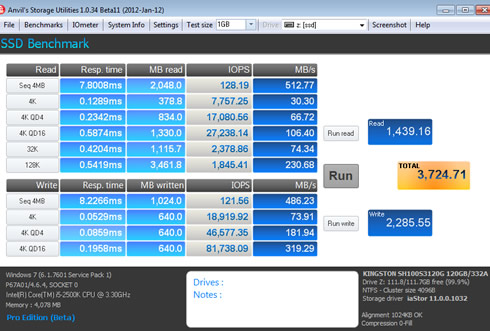
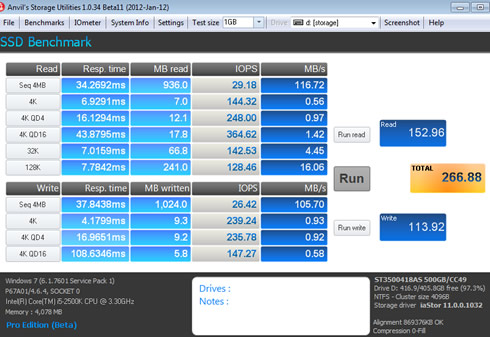
We used the software with the Kingston HyperX 120GB SSD and tested the drive with 0-fill compression (RAW), 8% compression, 49% compression and finally 100 % (incompressible data). For comparison and since this is the first time we use this benchmark, we are also presenting the results of a 500GB HDD (ST3500418AS).

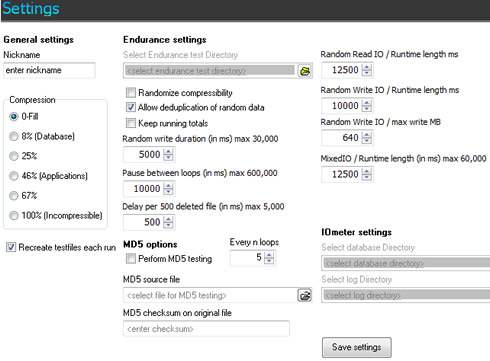
Here are the basic settings of the software:
And here are the results:

  • Kingston HyperX 120GB SSD - 0-fill

  • ST3500418AS 500GB HDD - 0-fill

  • Kingston HyperX 120GB SSD - compression 8%
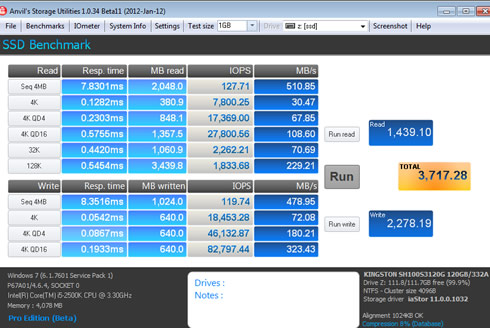
  • ST3500418AS 500GB HDD - compression 8%

  • Kingston HyperX 120GB SSD - compression 46%

  • Kingston HyperX 120GB SSD - compression 100%


Review Pages

1. Features
2. The drive
3. Benchmarks - page 1
4. Benchmarks - page 2
5. Benchmarks - page 3
6. Benchmarks - page 4
7. Summary


Pages

  • « first
  • ‹ previous
  • 1
  • 2
  • 3
  • 4
  • 5
  • 6
  • 7
  • next ›
  • last »

Kingston

Tags: Kingston
Previous Post
OCZ Octane 256GB SSD review
Next Post
ACRyan Veolo review

Related Posts

  • Kingston FURY Renegade Series PCIe 4.0 NVMe SSDs Pass 7 GB/sec

  • Kingston Digital Releases Next-Gen KC3000 PCIe 4.0 NVMe SSD

  • Kingston Ships 7.68TB Capacity for High-Performance Data Center SSDs

  • Kingston Releases New KC2500 NVMe PCIe SSD for High Performance Systems

  • Kingston Refreshes its ‘Canvas’ Card Series and ‘MobileLite Plus’ Readers

  • Kingston Releases 960GB to 7.6TB DC1000M Enterprise-class NVMe SSD

  • Kingston Releases the DC1000B NVMe SSD For Data Centers

  • CES 2020: Kingston Technology Demos Upcoming UHS-II Cards, NVMe PCIe Gen 4.0 SSDs

Latest Reviews

be quiet! Light Wings Pro IO fan
Cooling Systems

be quiet! Light Wings Pro IO fan

Why Intelligent Firmware Matters More Than Peak Throughput in NAS Systems
Enterprise & IT

Why Intelligent Firmware Matters More Than Peak Throughput in NAS Systems

Fanxiang MP83 M.2 NVMe SSD Enclosure
Enterprise & IT

Fanxiang MP83 M.2 NVMe SSD Enclosure

Ugreen CM642 USB4.0 Enclosure
PC components

Ugreen CM642 USB4.0 Enclosure

be quiet! Dark Power 14 IO
PC components

be quiet! Dark Power 14 IO

Popular News

MSI’s Latest AMD X870E MAX & EVO Series Motherboards

MSI’s Latest AMD X870E MAX & EVO Series Motherboards

COLORFUL Launches iGame B850M ULTRA Series Micro-ATX Motherboards

COLORFUL Launches iGame B850M ULTRA Series Micro-ATX Motherboards

COLORFUL Presents Limited Edition Chitu MAG-60 Magnetic Keyboard Inspired by the Year of the Horse

COLORFUL Presents Limited Edition Chitu MAG-60 Magnetic Keyboard Inspired by the Year of the Horse

COLORFUL Launches iGame B850I MINI OC V14 Motherboard

COLORFUL Launches iGame B850I MINI OC V14 Motherboard

COLORFUL Launches the iGame X870E VULCAN W OC Motherboard

COLORFUL Launches the iGame X870E VULCAN W OC Motherboard

COLORFUL Presents iGame Z890 ULTRA-S W and iGame Z890M ULTRA Z Motherboards

COLORFUL Presents iGame Z890 ULTRA-S W and iGame Z890M ULTRA Z Motherboards

COLORFUL Expands B850 Motherboard Lineup with New CVN, Battle-Ax, and MEOW Models

COLORFUL Expands B850 Motherboard Lineup with New CVN, Battle-Ax, and MEOW Models

ASRock Adds Support for One Sub-Channel DRAM Module on Intel DDR5 Motherboards

ASRock Adds Support for One Sub-Channel DRAM Module on Intel DDR5 Motherboards

Main menu

  • Home
  • News
  • Reviews
  • Essays
  • About
    • Submit News

    • Contact Us
    • Privacy

    • Promotion
    • Advertise

    • RSS Feed
  • About
  • Privacy
  • Contact Us
  • Promotional Opportunities @ CdrInfo.com
  • Advertise on out site
  • Submit your News to our site
  • RSS Feed