Breaking News

ASUSTOR has announced the release of the new upgraded Lockerstor Gen2 Plus HighPoint and Graid Technology Announce Breakthrough Gen5 Parity Storage Benchmark Why has G.SKILL DRAM memory prices increased so much recently (since 2025 Q4) Samsung Expands Premium Micro RGB TV Lineup for 2026 with New Sizes and Advanced Features Viltrox AF 35mm F1.2 LAB Z Launch Ends Year With a Milestone

logo

  • Share Us
    • Facebook
    • Twitter
  • Home
  • Home
  • News
  • Reviews
  • Essays
  • Forum
  • Legacy
  • About
    • Submit News

    • Contact Us
    • Privacy

    • Promotion
    • Advertise

    • RSS Feed
    • Site Map

Search form

Intel P35 Motherboard Roundup Vol2

Oct 11,2007 0

7. Biostar TP35D3-A7 Deluxe BIOS


Review Pages

1. Introduction
2. Asus Blitz Formula SE Retail Package
3. Asus Blitz Formula SE BIOS
4. Asus Blitz Extreme Retail Package
5. Asus Blitz Extreme BIOS
6. Biostar TP35D3-A7 Deluxe Retail Package
7. Biostar TP35D3-A7 Deluxe BIOS
8. Test Configuration
9. Everest Ultimate Edition 2007
10. SiSOFT Sandra
11. PCMARK - 3DMARK
12. Science Mark - PovRay - x264 Benchmark
13. Maxon Cinebench
14. SuperPi
15. SYSmark 2007 - WorldBench
16. Lost Planet: Extreme Condition
17. Overclocking DDR2 Motherboards
18. Overclocking DDR3 motherboards
19. Conclusion


The Biostar TP35D3-A7 Deluxe BIOS is based on the Phoenix - Award BIOS.
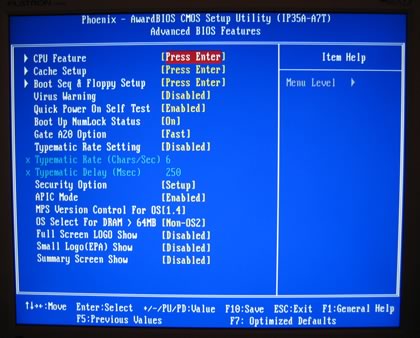
The most interesting tab is the "Overclock Navigator Engine" .

There are three pre-defined overclocking settings:

  • V6 Tech Engine: This setting will raise about 10%~15% of whole system performance.
  • V8 Tech Engine: This setting will raise about 15%~25% of whole system performance.
  • V12 Tech Engine: This setting will raise about 25%~30% of whole system performance

Manual overclocking allows most settings to be set according to your needs.
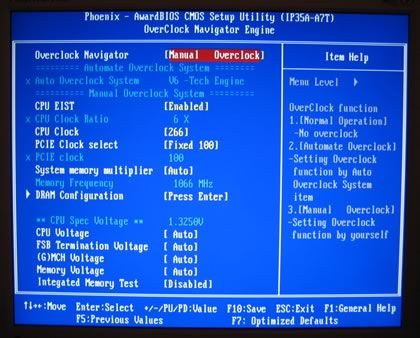
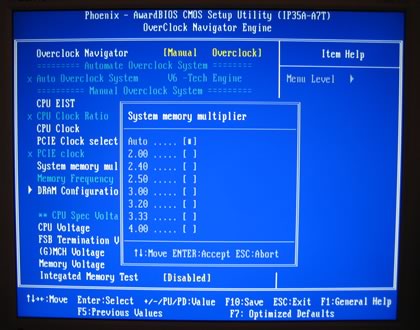
Most settings are easy to understand, however the System Memory Multiplier, could be made easier:
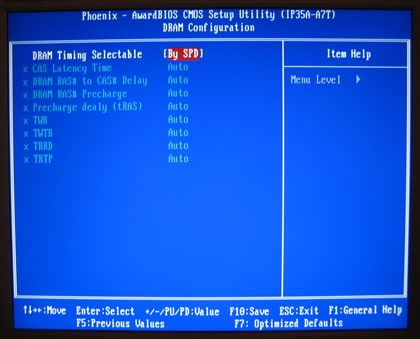
DRAM timings can be set either from SPD or manually. Note that you cannot set DRAM 1T working mode.
What's rather annoying is the fact that you cannot set voltages in absolute values, but only offsets from the the BIOS default.
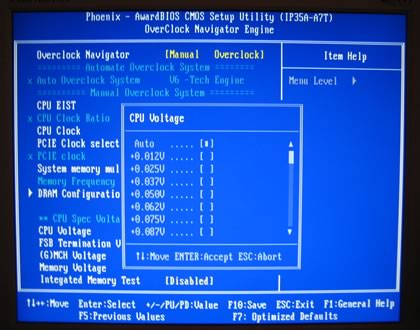
The rest of the voltages are not what we have seen with the Asus boards. They are rather limited.

  • FSB: 1.35~1.55V
  • MCH: 1.35~1.55V
  • DRAM: +0.05V~0.35V

Under PC Health Status, we can see the voltages and temperatures. Note that there seems to be some kind of Vcore leakage in the displayed values, since not all times do you get what you set in the voltage corresponding page...

- Installation

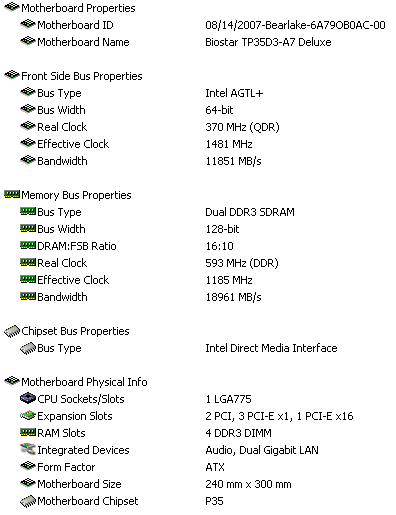
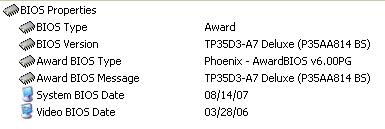
Using Everest Ultimate Edition 2007, we can get more information about the board:
Both the North Bridge and South Bridge chipsets unveiled:


For all tests, we used the latest available BIOS.
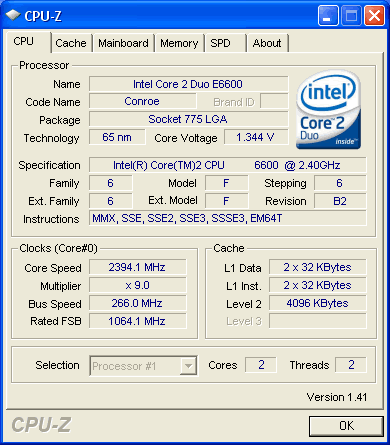
Let's now see how our CPU was identified by CPU-Z:
 

Review Pages

1. Introduction
2. Asus Blitz Formula SE Retail Package
3. Asus Blitz Formula SE BIOS
4. Asus Blitz Extreme Retail Package
5. Asus Blitz Extreme BIOS
6. Biostar TP35D3-A7 Deluxe Retail Package
7. Biostar TP35D3-A7 Deluxe BIOS
8. Test Configuration
9. Everest Ultimate Edition 2007
10. SiSOFT Sandra
11. PCMARK - 3DMARK
12. Science Mark - PovRay - x264 Benchmark
13. Maxon Cinebench
14. SuperPi
15. SYSmark 2007 - WorldBench
16. Lost Planet: Extreme Condition
17. Overclocking DDR2 Motherboards
18. Overclocking DDR3 motherboards
19. Conclusion
 

Pages

  • « first
  • ‹ previous
  • …
  • 3
  • 4
  • 5
  • 6
  • 7
  • 8
  • 9
  • 10
  • 11
  • …
  • next ›
  • last »

Intel

ASUS

P35

DDR2

DDR3

Tags: Intel ASUS P35 DDR2 DDR3
Previous Post
Intel X38 Motherboard Roundup
Next Post
Crucial BallistiX DDR3-1600

Related Posts

  • ASUS Announces Prime AP303 Compact Mid-Tower ATX Case

  • ASUS TUF Gaming Unveils Call of Duty Black Ops 7 Edition AMD Radeon RX 9070 XT

  • ASUS Announces October Availability of ProArt Display 8K PA32KCX

  • ASUS Unveils ProArt PA401, PA602 Wood Edition PC Cases with Retro Colors

  • ASUS Announces ExpertCenter PN54-S1 Mini PC

  • ASUS Announces ExpertCenter P600 AiO

  • ASUS Announces Turbo Radeon AI Pro R9700 32GB Graphics Card

  • Intel and NVIDIA to Jointly Develop AI Infrastructure and Personal Computing Products

Latest Reviews

EnGenius ECW520 AP
Enterprise & IT

EnGenius ECW520 AP

Noctua NP-DM3 desk mat
Gaming

Noctua NP-DM3 desk mat

Crucial P510 2TB NMVE
PC components

Crucial P510 2TB NMVE

The Quiet Technology Behind the Spin
Enterprise & IT

The Quiet Technology Behind the Spin

Crucial DDR5 Pro 6400 CL32
PC components

Crucial DDR5 Pro 6400 CL32

Popular News

COLORFUL Introduces CVN B850I GAMING FROZEN Motherboard

COLORFUL Introduces CVN B850I GAMING FROZEN Motherboard

COLORFUL Presents CVN X870 ARK FROZEN Motherboard for AMD Ryzen 9000 CPUs

COLORFUL Presents CVN X870 ARK FROZEN Motherboard for AMD Ryzen 9000 CPUs

COLORFUL Presents the B860 Series Motherboards

COLORFUL Presents the B860 Series Motherboards

Intel-AMD new motherboards announced

Intel-AMD new motherboards announced

TEAMGROUP Launches EXPERT P34F Find My External SSD

TEAMGROUP Launches EXPERT P34F Find My External SSD

ASRock AM5 Motherboards Now Fully Support AMD Ryzen 9 9950X3D & 9900X3D Processors

ASRock AM5 Motherboards Now Fully Support AMD Ryzen 9 9950X3D & 9900X3D Processors

Samsung announces Galaxy Tab S11 and Galaxy S25 FE series

Samsung announces Galaxy Tab S11 and Galaxy S25 FE series

Viltrox Showcases Upcoming Lens Lineup and New TTL Flash at IBC 2025

Viltrox Showcases Upcoming Lens Lineup and New TTL Flash at IBC 2025

Main menu

  • Home
  • News
  • Reviews
  • Essays
  • Forum
  • Legacy
  • About
    • Submit News

    • Contact Us
    • Privacy

    • Promotion
    • Advertise

    • RSS Feed
    • Site Map
  • About
  • Privacy
  • Contact Us
  • Promotional Opportunities @ CdrInfo.com
  • Advertise on out site
  • Submit your News to our site
  • RSS Feed