Breaking News

Logitech G325 LIGHTSPEED Delivers Comfort, Style, and Game-Ready Audio Samsung Launches Glasses-Free 3D Digital Signage Globally at ISE 2026 Levelplay Launches Combat Liquid HUD and Combat Liquid SE AIO CPU Coolers Intel Launches new Intel Xeon 600 Processors for Workstation Club 3D Announced their first new products of 2026

logo

  • Share Us
    • Facebook
    • Twitter
  • Home
  • Home
  • News
  • Reviews
  • Essays
  • Forum
  • Legacy
  • About
    • Submit News

    • Contact Us
    • Privacy

    • Promotion
    • Advertise

    • RSS Feed
    • Site Map

Search form

Google Assistant is now on Android TV

Google Assistant is now on Android TV

Consumer Electronics Sep 28,2017 0

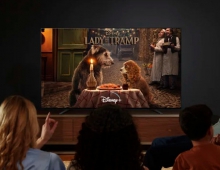
Google Assistant is now available on Android TV, starting with NVIDIA SHIELD TV today and Sony Bravia TVs in the coming months.

With your Assistant on Android TV, you can jump right into your favorite show, find the latest blockbuster, check the score of the big game, dim the lights and more - all with just your voice. To get started, accept the Google Assistant system update on your SHIELD and press your remote's mic button after the device restarts.

Voice commands are handled from the remote, which has a microphone built in. Users can either press the mic button and issue a command or just say "OK Google" while the box is on. On Android TV, the Google Assistant specializes in navigation and content searching. You can ask it to play shows by name, and as long as you're subscribed to the right content providers, the shows will just play. There are general remote control commands like "pause" and "unpause," and you also get access to the full suite of other Google Assistant commands, like controlling smart home devices, asking questions, and accessing third-party voice apps.

Also, to celebrate the arrival of the Google Assistant on Android TV, Google is offering a free three month YouTube Red trial on SHIELD, so you can watch ad-free videos and listen to uninterrupted music with your Assistant (try saying "play 4K videos on YouTube").

Starting today, SHIELD users in the U.S. can upgrade their TV experience with the Google Assistant.

Tags: Google assistantAndroid TV
Previous Post
Twitter's Disclosures About Russia-linked Accounts are not Enough, U.S. senator Says
Next Post
LG V30 and V30+ Smartphones Coming in the U.S.

Related Posts

  • New Android TV Streaming Device Said to Impress

  • Disney+ Launches on Sony Android TVs

  • Google Assistant Can Read Website Articles Aloud

  • Research Shows That Smart Speakers Could Record Users Up to 19 Times Per Day

  • U.S. ITC Opens Patent Probe into Google Speakers After Sonos Inquiry

  • Google Says Assistant is Used by More Than 500 Million People

  • CES: Epson Unveils Smart Streaming Laser Projectors with Android TV

  • Google Brings Real-time Translation to Your Phone

Latest News

Logitech G325 LIGHTSPEED Delivers Comfort, Style, and Game-Ready Audio
Consumer Electronics

Logitech G325 LIGHTSPEED Delivers Comfort, Style, and Game-Ready Audio

Samsung Launches Glasses-Free 3D Digital Signage Globally at ISE 2026
Consumer Electronics

Samsung Launches Glasses-Free 3D Digital Signage Globally at ISE 2026

Levelplay Launches Combat Liquid HUD and Combat Liquid SE AIO CPU Coolers
Cooling Systems

Levelplay Launches Combat Liquid HUD and Combat Liquid SE AIO CPU Coolers

Intel Launches new Intel Xeon 600 Processors for Workstation
Enterprise & IT

Intel Launches new Intel Xeon 600 Processors for Workstation

Club 3D Announced their first new products of 2026
Consumer Electronics

Club 3D Announced their first new products of 2026

Popular Reviews

be quiet! Dark Mount Keyboard

be quiet! Dark Mount Keyboard

Terramaster F8-SSD

Terramaster F8-SSD

be quiet! Light Mount Keyboard

be quiet! Light Mount Keyboard

Soundpeats Pop Clip

Soundpeats Pop Clip

Akaso 360 Action camera

Akaso 360 Action camera

Dragon Touch Digital Calendar

Dragon Touch Digital Calendar

be quiet! Pure Loop 3 280mm

be quiet! Pure Loop 3 280mm

Noctua NF-A12x25 G2 fans

Noctua NF-A12x25 G2 fans

Main menu

  • Home
  • News
  • Reviews
  • Essays
  • Forum
  • Legacy
  • About
    • Submit News

    • Contact Us
    • Privacy

    • Promotion
    • Advertise

    • RSS Feed
    • Site Map
  • About
  • Privacy
  • Contact Us
  • Promotional Opportunities @ CdrInfo.com
  • Advertise on out site
  • Submit your News to our site
  • RSS Feed