1. Sapphire Radeon 9800 Pro Ultimate
SAPPHIRE RADEON 9800 PRO ULTIMATE 128MB
 After
the Cebit exhibition we eagerly have been waiting to get the first VGA card.
When Sapphire's 9800 Pro came first to our office, a sense of both amazement
and thrill overshadowed us. We all had in mind that with this card, CDRInfo
was about to make its debut in the VGA card section. And yes, the Radeon 9800
Pro is a good milestone to start our VGA section establishment with.
After
the Cebit exhibition we eagerly have been waiting to get the first VGA card.
When Sapphire's 9800 Pro came first to our office, a sense of both amazement
and thrill overshadowed us. We all had in mind that with this card, CDRInfo
was about to make its debut in the VGA card section. And yes, the Radeon 9800
Pro is a good milestone to start our VGA section establishment with.
Sapphire best known for its qualitative products, offered to
send us its 128 MB DDR Radeon 9800 Pro Atlantis. Although
a new generation of ATI's VGA cards based
on the R420 GP has launched, its previous high-tech answers included the
9800 Pro card which is widely known for its good performance and high overclocking
capabilities.
But let's see what the ultimate version has to offer.
- Specifications
| GPU |
RADEON 9800 PRO VPU (R350) |
| Memory Bus Width |
128 MB DDR |
| Memory interface |
256 Bit DDR |
| Memory Type |
DDR1 |
| Core clock |
380 MHz |
| Memory clock |
680 Mhz (340x2) |
| Memory Bandwidth |
21.8 GB/sec |
| Pixel FillRate |
3.04 Gpixels/sec |
| Geometry rate |
380 Mtriangles/sec |
| Bus |
2x/4x/8x |
| Processing technology |
0.13µ |
| Output Connections |
VGA + TV + DVI |
| Cooling |
Zalman double-side Heat sink |
| 2D supported Resolutions & Hz |
640x480@200, 800x600@200, 1024x768@200, 1152x864@100,
1280x1024@160, 1600x1200@120, 1920x1080@100, 1920x1200@100, 1920x1440@85,
2048x1536@75 |
| 3D Maximum resolution |
2048x1536 with 16.7M colors |
| Anisotropic Filtering modes |
2x/4x/8x/16x |
| Anti-Aliasing modes |
2x/4x/6x |
| Ramdac |
400 Mhz |
| Pipelines |
8 |
| Texture unit per pixel pipeline |
1 |
| Technologies supported |
- SMARTSHADER 2.1 technology allows users to experience complex, movie-quality
effects in next-generation 3D games and applications
- SMOOTHVISION 2.1 technology enhances image quality by removing jagged
edges and bringing out fine texture detail, without compromising performance
- Unique VIDEOSHADER engine uses programmable pixel shaders to accelerate
video processing and provide better-looking visuals
- FULLSTREAM technology removes blocky artifacts from Streaming and Internet
video and provides sharper image quality
- HyperZ III+ technology improves rendering performance |
| Pixel Shader Support |
2.0+ |
| Vertex Shader Support |
2.0+ |
| DTV/HDTV Decoding |
Supported |
| Package contents |
-Instruction Manual
-Installation Driver Disk
-Cyberlink Power DVD
-Redline Tweak Utility
-Tomb Raider : The Angel of Darkness
-S-Video Cable
-RCA Cable
-DVI to VGA Adapter
-S-Video to RCA Adapter |
| System requirements |
The system requirements for the card and complementary
software:
- PC with Pentium 4 / III 450 MHz or AMD Athlon processor with AGP 4x/8x
universal slot
-128MB of system memory and 1.6 GB of hard disk space
-8x speed CD-ROM drive, DVD playback requires DVD drive
-300-Watt power supply or greater
- Windows 2000, 98SE, ME, XP and DirectX 9.0
- Microsoft DirectX 3.0 compatible sound card
- Monitor supported: CRT-15 pin, Svideo, Composite and DVI-I (LCD)
|
- 3D Mark Detailed specifications

- The chipset
What's special for the Ultimate series? The non-ultimate series
are equipped with a huge fan which covers the core of the chipset. Fans are
noisy and as every movie-lover knows, the most irritating thing when watching
a movie is the bumbling noise of the cooling fan.
Daniel Forster, Sapphire's Senior Manager
said the following about the Ultimate series: "This card was built to
enable people to be able to build silent yet powerful systems. You want to
hear your movies or games in a PC not all the fans in the system - so in the
future noise levels this will become more and more important with PC moving
into the living room as all round multimedia machines. This is why we build
these cards."
According to Mr Forster, the noise problem was the key factor for the development
of the Ultimate series. As you can see from the following picture, the irritating
fan has been substituted with a double-sided, massive but silent heat pipe
system.

Front side

Back side
The only problem with the fluid-cooling system is its massive size. Unfortunately
it takes the place of the PCI slot which is next to the AGP. Although it is
little bunglesome, it does its job with absolute silence.

Front side exposed
Removing the screws we were able to see the chipset. As you can
see two small heat sinks protect the DDR memories from overheating. Unstucking
them we were able to have a closer look on the DDR.
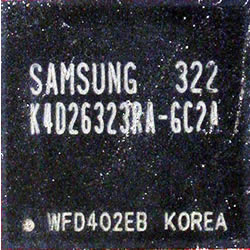
The
card wears the common Samsung K4D26323RA-GC2A memory chips with 2.8ns access
time at 680 Mhz.

Removing the heat paste conductor we took a pic of the R350
GPU.

This label verifies that the chipset is nothing more or less
than the Radeon 9800Pro 128M DDR
- Deeper look in the cooling system

The cooling system is consisted of a massive metallic heatsink
which covers the both sides of the card, and a magneto-like pipe.

The thermojunction of the GPU
- How it works

A special liquid is sealed inside the pipe which when it is heated
vaporizes. The hot vapor then gets drawn to the other bottom side the heatsink,
giving up its heat. After this the vaporized liquid solidifies and it's drawn
back to the heat source again. Fascinating, simple and cool!


The Sapphire Atlantis Radeon 9800 Pro Ultimate uses the standard
VGA, S-Video, and DVI connections with TV-Out functionality.
- Package contents
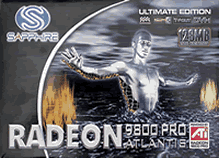 The
package contents the instruction manual and the Installation Driver
Disk for the technical section. The bundle software is consisted
of Cyberlink Power DVD, Redline Tweak Utility and the game
Tomb Raider : The Angel of Darkness. As for the connectivity the card
comes with an S-Video Cable, an RCA Cable, a DVI to VGA
Adapter and an S-Video to RCA Adapter.
The
package contents the instruction manual and the Installation Driver
Disk for the technical section. The bundle software is consisted
of Cyberlink Power DVD, Redline Tweak Utility and the game
Tomb Raider : The Angel of Darkness. As for the connectivity the card
comes with an S-Video Cable, an RCA Cable, a DVI to VGA
Adapter and an S-Video to RCA Adapter.
In the hardware aspect, the Ultimate series
chipset is exactly the same as its previous 9800 Pro model. As we have already
mentioned the Ultimate model differentiates for its soundless cooling heat
pipe system. Also the memory clock speed is lower than the original Pro
model (perhaps for overheating reasons).
2. Exair Radeon 9800 XT
EXAIR RADEON 9800 XT 256MB
 Except
from being a supporter of Nvidia chipsets, Exair offers great VGA solutions
based on ATI's Radeon GPU. The Radeon 9800 XT chipset has many advancements
that the former Pro model. Although it is based on the same GPU, the XT series
have higher clock speeds on both GPU and Memory. You can say that the 9800
XT is a tweaked revision of the Pro model. But let's have a deeper perspective
on this card.
Except
from being a supporter of Nvidia chipsets, Exair offers great VGA solutions
based on ATI's Radeon GPU. The Radeon 9800 XT chipset has many advancements
that the former Pro model. Although it is based on the same GPU, the XT series
have higher clock speeds on both GPU and Memory. You can say that the 9800
XT is a tweaked revision of the Pro model. But let's have a deeper perspective
on this card.
- Specifications
| GPU |
RADEON 9800 XT (R360) |
| Memory Bus Width |
256MB DDR MEMORY
|
| Memory interface |
256 Bit DDR |
| Memory Type |
DDR1 |
| Core Clock |
412 MHz |
| Memory Clock |
730 Mhz (364x2) |
| Memory Bandwidth |
23.4 GB/sec |
| Pixel FillRate |
3.3 Gpixels/sec |
| Geometry rate |
412 Mtriangles/sec |
| Bus |
8x/4x/2x AGP |
| Processing technology |
0.15µ |
| Output Connections |
VGA + TV + DVI |
| Cooling |
Dual-slot Fansink |
| 2D Display Resolutions & Hz |
640x480@200, 800x600@200, 1024x768@200, 1152x864@100,
1280x1024@160, 1600x1200@120, 1920x1080@100, 1920x1200@100, 1920x1440@85,
2048x1536@75 |
| 3D Maximum resolution |
2048x1536 with 16.7M colors |
| Anisotropic Filtering modes (AF) |
2x/4x/8x/16x |
| Full Scene Anti-Aliasing (FSAA) modes |
2x/4x/6x |
| Dual Display |
Supported |
| Pipelines |
8 |
| Texture units per pixel pipeline |
1 |
| Technologies supported |
- SMARTSHADER 2.1 technology allows users to experience complex, movie-quality
effects in next-generation 3D games and applications
- SMOOTHVISION 2.1 technology enhances image quality by removing jagged
edges and bringing out fine texture detail, without compromising performance
- Unique VIDEOSHADER engine uses programmable pixel shaders to accelerate
video processing and provide better-looking visuals
- FULLSTREAM technology removes blocky artifacts from Streaming and Internet
video and provides sharper image quality
- HyperZ III+ technology improves rendering performance
- OVERDRIVE Automatic overclocking |
| Pixel Shader Support |
2.0+ |
| Vertex Shader Support |
2.0+ |
| DTV/HDTV decoding |
Supported
|
| System requirements |
The minimum system requirements for the card and complementary
software:
- PC with Pentium 4 / III / II / Celeron, AMD K6 / Duron / Athlon / Athlon
XP with 450 MHz
-128MB of system memory and 1.6 GB of hard disk space
-8x speed CD-ROM drive, DVD playback requires DVD drive
-300-Watt power supply or greater
- Windows 2000, 98SE, ME, XP and DirectX 9.0
- Microsoft DirectX 3.0 compatible sound card
- Monitor supported: CRT-15 pin, Svideo, Composite and DVI-I (LCD)
|
- 3D Mark detailed specifications

- The chipset
The Radeon 9800 XT has a higher core speed at 412MHz, 32 MHz higher than the
Radeon 9800 Pro at 238 MHz. Also a higher memory clock speed has been achieved
at 730 from 700. Although ATI has done a good job by braking the 400 MHz core
speed limit, there are some other matters technical issues need to be put into
consideration. Having in mind that the now achieved clock speeds were prohibitive
with the Pro series, it is interesting to see what cooling method ATI used
to perform such admirable a boost.

Front side. Despite the cooler's size, it is very silent. One of the best cooling
solutions based on fan architecture.

On the back side we found the holder of the fan which also reacts as heat
sink, and covers the 50% of the chipset.

The Radeon 9800 XT exposed

The R360 GPU in its all magnificence

Hynix DDR memories used

As you can see, the Radeon 9800 XT wears a new copper cooler. This new cooler
is larger and heavier than the heatsink/fan cooling techniques on the Pro cards.
The fan adjusts it's speed according to the chip temperature. Despite the fan's
size, we didn't experience irritating noise. These features makes it an awesome
cooler.

As you can see in the pictures, the 9800 XT is equipped with the standard
outputs: one VGA, one DVI, and one video out. With the new cooler, ATI says
the 9800 XT
is more overclockable and faster than its forerunner. In the comparison test
that follows you will be able to
see yourselves if ATI's statement is true or not.
- Package contents
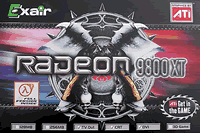 -Instruction Manual
-Installation Driver Disk
-Cyberlink Power DVD
-Half Life2 (coupon for free downloading)
-S-Video Cable
-RCA Cable
-S-Video to RCA Adapter
3. Asus V9950 FX 5900 GE
ASUS V9950 FX 5900 GE 128MB
 Although
Asus' 5900 VGA card has been released on the market a long time time ago,
it is still one of the top FX models based on the NV35 GPU currently available.
So, even for comparison reasons
the
V9950 is a good reference. We have in our hands the V9950 FX 5900 Gamer
Edition. Although this card belongs to the previous generation, in this review
you will also be able to see the card's performance in the latest cutting edge
games.
Although
Asus' 5900 VGA card has been released on the market a long time time ago,
it is still one of the top FX models based on the NV35 GPU currently available.
So, even for comparison reasons
the
V9950 is a good reference. We have in our hands the V9950 FX 5900 Gamer
Edition. Although this card belongs to the previous generation, in this review
you will also be able to see the card's performance in the latest cutting edge
games.
- Specifications
| GPU |
GEFORCE FX 5900 (NV 35) |
| Memory Bus Width |
128MB DDR MEMORY
|
| Memory interface |
256 Bit DDR |
| Memory Type |
BGA DDR2 |
| Core Clock |
400 MHz |
| Memory Clock |
700 Mhz (2x350) |
| Memory Bandwidth |
22.4 GB/sec |
| Pixel FillRate |
3.2 Gpixels/sec |
| Geometry rate |
300 Mtriangles/sec |
| Bus |
8x/4x/2x AGP |
| Processing technology |
0.13µ |
| Output Connections |
VGA + TV + DVI |
| Cooling |
single-slot Fansink |
| 2D Display 32 bit Resolutions & Hz |
640x480@240, 800x600@240, 1024x768@200, 1152x864@170,
1280x1024@150, 1600x1200@100, 1920x1440@75, 2048x1536@60 |
| 3D Maximum resolution |
2048x1536 with 16.7M colors |
| Anisotropic Filtering modes (AF) |
2x/4x/8x |
| Full Scene Anti-Aliasing (FSAA) modes |
1x/2x/4x/6x/8x |
| Dual Display |
Supported |
| Pipelines |
4 |
| Texture units per pixel pipeline |
2 |
| Technologies supported |
- Intellisample HCT is a new compression scheme for
better compression at high resolutions with Anti-Aliasing.
- UltraShadow Technology enables a Higher Quality
and cinematic experience in games
- CineFX 2.0 Engine delivers cinema-quality video
to your PC
- LMA II contains a lossless form of Z-compression, saving memory bandwidth
for higher performance
|
| Pixel Shader Support |
2.0+ |
| Vertex Shader Support |
2.0+ |
| DTV/HDTV decoding |
Supported
|
| System requirements |
The recommended system requirements for the card and
complementary software:
- PC with Pentium 4 / III 450 MHz or AMD Athlon processor with AGP 4x/8x
universal slot
-64MB of system memory
-8x speed CD-ROM drive, DVD playback requires DVD drive
- Windows 2000, 98SE, ME, XP and DirectX 9.0
- Microsoft DirectX 3.0 compatible sound card
|
- 3D Mark detailed specifications

- The chipset

With that golden fan the card looks really nice. Also two golden heatsinks
cover the DDR2 memories.

After removing the peachy fan, the two memory heatsinks and
the heat paste conductor we were able to see the following:

Asus V9950 GeForce 5900 exposed for your eyes only.

Back side

A closer look at the "brain" of the card,

and the memories. Samsung as usual.

As you can see from above, the Asus FX 5900 is equipped
with the following
outputs: one VGA, one DVI, and one video out.
- The package
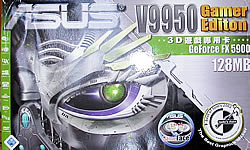 The software bundle contains several tools: ASUS Tweak (overclocking),
ASUS SmartDoctor (hardware monitoring), ASUS Video Security, Digital VCR and
ASUS
Live Update. The card also includes the ASUS DVD XP v4.0 DVD player software
and the ASUS GameFace for real-time video/audio communication.
The software bundle contains several tools: ASUS Tweak (overclocking),
ASUS SmartDoctor (hardware monitoring), ASUS Video Security, Digital VCR and
ASUS
Live Update. The card also includes the ASUS DVD XP v4.0 DVD player software
and the ASUS GameFace for real-time video/audio communication.
The gaming bundle is a great variety of last year's great games and it's consisted
of "Gunmetal" (2003), "Battle Engine Aquila" (2003) and "Delta
Force - Black Hawk Down" (2003). A compact disk with the latest gaming
demos ("Splinter Cell," "Warcraft III," "Big Mutha
Truckers," "Breed," "Colin McRae Rally 3," "Toca
Race Driver") is also included. The greatest variety of software we have
ever seen.
4. Exair GeForce FX 5900 XT
EXAIR GEFORCE FX 5900 XT 128MB
Established
in 1998, Exair Computer began as a hardware manufacturer that marketed Graphic
cards, TFT LCD monitors, TV Tuner cards, and Modem for the European market.
Exair's VGA card solutions are based on both ATI's and Nvidia's GPUs. If you
take a look on Exair's site you will see a great variety of VGA cards such
as the Radeon 9800 XT and the Nvidia FX 5950 Ultra high-tech series.
In this comparison review we also include Exair's Geforce 5900
XT with 128MB DDR. Below you can see the preferences, screenshots and general
hardware issues about the card. The benchmarks and game test comparisons are
included in the following pages.
- Specifications
| GPU |
GEFORCE FX 5900 XT (NV 35) |
| Memory Bus Width |
128MB DDR MEMORY |
| Memory interface |
256 Bit DDR |
| Memory Type |
BGA DDR2 |
| Core Clock |
400 MHz |
| Memory Clock |
700 Mhz (2x350) |
| Memory Bandwidth |
22.4 GB/sec |
| Pixel FillRate |
3.2 Gpixels/sec |
| Geometry rate |
300 Mtriangles/sec |
| Bus |
8x/4x/2x AGP |
| Processing technology |
0.15µ |
| Output Connections |
VGA + TV + DVI |
| Cooling |
single-slot Fansink |
| 2D Display Resolutions & Hz |
640x480@240, 800x600@240, 1024x768@200, 1152x864@170,
1280x1024@150, 1600x1200@100, 1920x1440@85, 2048x1536@85 |
| 3D Maximum resolution |
2048x1536 with 16.7M colors |
| Anisotropic Filtering modes (AF) |
2x/4x/8x/16x |
| Full Scene Anti-Aliasing (FSAA) modes |
2x/4x/6x/8x |
| Dual Display |
Supported |
| Pipelines |
4 |
| Texture units per pixel pipeline |
2 |
| Technologies supported |
- Intellisample HCT is a new compression scheme for
better compression at high resolutions with Anti-Aliasing.
- UltraShadow Technology enables a Higher Quality
and cinematic experience in games
- CineFX 2.0 doubles the performance of floating-point
pixel shader operations.
- LMA II contains a lossless form of Z-compression, saving memory bandwidth
for higher performance.
|
| Pixel Shader Support |
2.0+ |
| Vertex Shader Support |
2.0+ |
| DTV/HDTV decoding |
Supported
|
| System requirements |
The minimum system requirements for the card and complementary
software:
- PC with Pentium 4 / III 450 MHz or AMD Athlon processor with AGP 4x/8x
universal slot
-128MB of system memory and 1.6 GB of hard disk space
-8x speed CD-ROM drive, DVD playback requires DVD drive
-300-Watt power supply or greater
- Windows 2000, 98SE, ME, XP and DirectX 9.0
- Microsoft DirectX 3.0 compatible sound card
- Monitor supported: CRT-15 pin, Svideo, Composite and DVI-I (LCD)
|
Judging by the Specifications of the GeForce FX 5900 XT, we conclude
that this model is slightly lighter that its predecessor. When ATI launched
its XT series, they were definitely more powerful than its Pro series. It
seems that the "XT" expression has different meaning for ATI and
Nvidia. So be careful and never judge a VGA card by its name!
- 3D Mark detailed specifications

- The chipset

The front side. Nothing revolutionary.
As for the technical aspect, there's nothing spectacular about
the card architecture. The plain single-slot Fansink doesn't look very promising
and there surely are better cooling solutions than this. Exair has launched
some other awesome Nvidia based cards with a lot better and more impressive
cooling solutions. You can view them here.
Perhaps in the future we'll have the opportunity to review
some of them.

and the back side

Samsung memory chipset on board
- Package Contents
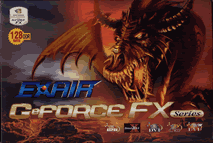 -Hardware Installation Guide
-Installation Driver Disk
-DC Cable
-TV connector
5. Test specifications
Test specifications
- Test PC
- Processor Retail Intel Pentium 4 2.4C
- CPU Cooler Zalman 7000Cu
- Case Antec 1080AMG
- Motherboard: ASUS P4C800-E Deluxe (firmware 1014)
- Memory: 2x256MB OCZ
PC-4200EL Memory
- Hard Disk Drive: WD800JD 80GB 7200RPM
- CD-RW: LiteOn LTR-52246S
- PowerSupply: Levicom 500Watt
- Microsoft WindowsXP Pro Service Pack1
- DirectX v9.0b

Our test PC with Sapphire R9800 Ultimate on.
- Benchmarking Software
- 3DMark03 Build 340
- Codecreatures Benchmark Pro v1.0
- AquaMark3 v3.0
- GLExcess v1.2
- RivaTuner 2.0 RC 14.3
- ATITool v0.0.20
- GeForce Tweak Utility
- Farcry v1.1 Build 1256
- Painkiller v1.15
- Unreal Tournament 2003 v2225
- Unreal Tournament 2004 v3186
- Tomb Raider: Angel of Darkness v49
- Halo 1.04
- Drivers used
- ATI boards -
CATALYST 4.4
- Nvidia boards - Detonator 56.72
6. 3DMark Benchmark tests
3DMark 2003 Build 340
 Although
3DMark is a widely known Direct 3D benchmarking software, we don't recommend
it for making concluding decisions about the performance
of a VGA card. During 2003 an issue arose, regarding 3DMark's reliability.
It was found that Nvidia tweaked its VGA cards in order to show better
results with 3DMark. This of course was a great cheat on users and a also
a substantial blast for 3Dmark. Madonion, 3DMark's manufacturer, unveiled
patches for its software correcting Nvidia's foxy cheat.
Although
3DMark is a widely known Direct 3D benchmarking software, we don't recommend
it for making concluding decisions about the performance
of a VGA card. During 2003 an issue arose, regarding 3DMark's reliability.
It was found that Nvidia tweaked its VGA cards in order to show better
results with 3DMark. This of course was a great cheat on users and a also
a substantial blast for 3Dmark. Madonion, 3DMark's manufacturer, unveiled
patches for its software correcting Nvidia's foxy cheat.
The fact
is that 3DMark has lost its former glory and many users have stopped
trusting
it solely. But to be fair it is still a good software for testing a VGA
card's capabilities and in our opinion it should not be missing from the
user's view.
3Dmark03 is consisted of 4 game benchmarks, sound tests, CPU
and feature tests. In this page we offer the average FPS comparison on the
game benchmarks, the fillrate test and the pixel shader 2.0 feature tests.
- Game Test 1 - Wings of Fury (DX7)
 This test is a combat flight simulator written for older hardware
(DirectX 7). Particles are used a lot in this test - smoke and vapour trails,
flak and gunfire, and explosions are produced using point sprites and quads.
This test is a combat flight simulator written for older hardware
(DirectX 7). Particles are used a lot in this test - smoke and vapour trails,
flak and gunfire, and explosions are produced using point sprites and quads.
There
are plenty planes but their polygon frame rate is low, as well as single
textured
background
object
are
used.
Hence
the average
fps (frames per second) are high for all cards.

No
minor performance differences, since the DX7 doesn't consume much power of
the newest VGA cards. It is visible though, that the ATI cards
performed better on this test.
 - Game Test 2 - Battle of Proxycon (DX8)
This test is a simulation of first person shooter game types.
1.1 and 1.4 Vertex
shaders are widely used since all character models are
skinned using vertex shaders.
This makes this test a good vertex shader comparison
for VGA cards.

The
Radeon 9800 XT shows its teeth on this test, proving its great ability handling
vertex shaders.
- Game Test 3 - Trolls' Lair (DX8)
 This
test should be the favorite of all RPG lovers. It is a cut scene of a female
warrior facing two malicious trolls. Again the same
vertex and pixel processing is used as in game test 2.
This
test should be the favorite of all RPG lovers. It is a cut scene of a female
warrior facing two malicious trolls. Again the same
vertex and pixel processing is used as in game test 2.
This test also uses
post-processing effects, such as Depth
of Field and Bloom effects
which are widely used in today's game cut scene sequences.

Identical
fps for the Nvidia cards. Here again the R9800 XT is on top.
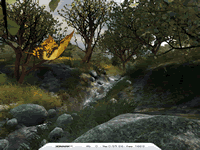 - Game Test 4 - Mother Nature (DX9)
This
game test represents the level of effects and realism that are possible using
2.0 vertex and pixel shaders, plus some other features that DirectX 9 offers.
The Radeon series are slightly more capable processing vertex and pixel
shaders 2.0, according to this test.

- 3DMark Official score
If you test your machine with 3DMark you can post the results
at 3DMark' online result browser. For more information visit futuremark.com.

From the start of the 3DMark game test series, the Radeon 9800
XT was on top. This is obvious since the Radeon XT model has the highest core
and memory frequencies in comparison with the other cards. It's also the
only that comes with 256 DDR. So it would surprise us if the Radeon 9800
XT wasn't first!
7. Aquamark3 Benchmark tests
Aquamark3
Aquamark
is a DirectX 9 benchmark and it's very useful for testing a card's performance
on DirectX9 applications. The benchmark a real world game engine, named
krass Engine.
Unlike synthetic benchmarks Aquamark3 allows benchmarking in
a real-world
scenario with an engine and art assets representing the complexity of current
state-of-the-art games. The results you get from Aquamark vary from  a general
result score (AquaMark Triscore),
which
is a
result of
9 chapters
each one utilizes different graphical operations.
a general
result score (AquaMark Triscore),
which
is a
result of
9 chapters
each one utilizes different graphical operations.
The chapters are the following:

In this section we present comparison charts for the following
chapters:High particle count, Vertex and pixel lightning and Massive
Overdraw
- High particle count
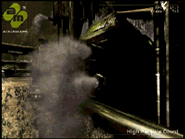 This chapter demonstrates a high number
of particles being used for simulating dust and smoke. Each particle is
approximated by a mass point with one degree of freedom for its rotation.
This chapter demonstrates a high number
of particles being used for simulating dust and smoke. Each particle is
approximated by a mass point with one degree of freedom for its rotation.
The
particle system of this test is designed to render a large number of physically
accurately simulated particles as efficiently as possible.

All
cards performed similarly, except the FX 9500GE which is a little back.
- Vertex and pixel lightning
 The
objects in this scene show a broad range of different material and lightning
effects
used in modern game engines.
The
objects in this scene show a broad range of different material and lightning
effects
used in modern game engines.
Aquamark3 tests two things: It applies many
vertex and pixel shader changes straining the graphics hardware and its
many texture lookups (determining the lighting contribution and material
reflectivity)
also strain the Multitexturing and
rasterization components.

The
GForce FX 5900 XT managed to surpass its rivals with a 52 FPS top score.
Here too the FX 9500 GE is last with 5 FPS back from the next card.
- Massive Overdraw
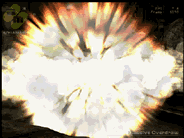 This
scene demonstrates the application of the particle system for large explosions.
The test stresses
the graphics hardware by the high overdraw of textured areas as many particles
overlap each other. A huge explosion that is included on this chapter, pushes
the VGA card to the limits. It's really awesome if you imagine the number
of pixels and shaders needed to make such a bombastic scene.
This
scene demonstrates the application of the particle system for large explosions.
The test stresses
the graphics hardware by the high overdraw of textured areas as many particles
overlap each other. A huge explosion that is included on this chapter, pushes
the VGA card to the limits. It's really awesome if you imagine the number
of pixels and shaders needed to make such a bombastic scene.
This is an important test, because the explosions in games require much vertex
and pixel processing. In many games when an explosion occurs, this cause
frames to drop suddenly at that particular moment. So this test is a simulation
of what to expect from your card when facing explosions and other similar
effects in games.

The
surprise continues with Exair FX 5900 XT on top. This shows the power of
the 5900 XT GPU when simulating explosions and other power consuming effects.
- Aquamark Triscore
The Aquamark Triscore comprises 3 values: the overall system performance,
the performance of the graphics system and the CPU performance. Keep
in mind that this is not the total result of the above tests, but the result
of the whole benchmark process including all 9 chapters.

With
only 63 points difference than the Radeon 9800 XT, the GeForce FX 5900 XT
is at top. Third is the R9800 Pro Ultimate and last the FX 5900GE.
These are surprising results since the GeForce 5900 XT has lower specifications
than
the other chipsets. Now let's see what the codecreatures have to say.
8. Codecreatures Benchmark tests
Codecreatures
 The
Codecreatures benchmark is written with Microsoft's DirectX 8.1 API and incorporates
the use of Vertex and PixelShaders popular on next generation 3D accelerators.
The
Codecreatures benchmark is written with Microsoft's DirectX 8.1 API and incorporates
the use of Vertex and PixelShaders popular on next generation 3D accelerators.
 The benchmark plays a photo-realistic nature scene and calculates
the performance of the graphics adapter by measuring the fps that it can
display at 1024x768, 1280x1024 and 1600x1200 resolutions. The score is a geometric
mean of those three resolutions called the Codecreatures number.
The benchmark plays a photo-realistic nature scene and calculates
the performance of the graphics adapter by measuring the fps that it can
display at 1024x768, 1280x1024 and 1600x1200 resolutions. The score is a geometric
mean of those three resolutions called the Codecreatures number.
For
this Benchmark we offer the average FPS results of each card in the following
resolutions: 1024x768, 1280x1024 and 1600x1200.

From
this chart the dominance of the R9800 XT is evident. In all resolutions the
R9800 XT was 3 FPS better than the second R9800 Pro Ultimate.
Third comes the Asus 5900GE and last the FX 5900 XT.
- Codecreatures number
The codecreatures number is the resulting score of the total
benchmarking process.
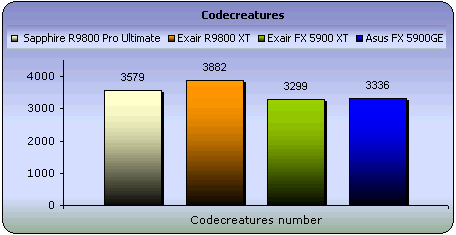
The
Same picture here as with the previous chart. This benchmark corresponds better
to the reality and the results are much alike with those we had with
3Dmark. But
let's
see the
cards'
performance
regarding
the
OpenGL graphical interface.
9. GL Excess Benchmark tests
GL Excess
 GL
Excess is very good tool for measuring the performance of VGA cards on OpenGL
applications and games. This benchmark is consisted of 12 scenes grouped
in 4 categories (3 scenes in 1 category). Each category renders different
OpenGL techniques. The overall result named XSMark is the sum
of the first scene of each category. All scenes were run in the 1024x768
resolution at 32bit.
GL
Excess is very good tool for measuring the performance of VGA cards on OpenGL
applications and games. This benchmark is consisted of 12 scenes grouped
in 4 categories (3 scenes in 1 category). Each category renders different
OpenGL techniques. The overall result named XSMark is the sum
of the first scene of each category. All scenes were run in the 1024x768
resolution at 32bit.
For comparison reason we tested each card with all 4 categories.
-
Category 1
 The first category include scenes 1,9 and 12. Nothing specific
is stressed on these scenes. Just average use of general OpenGL techniques.
The first category include scenes 1,9 and 12. Nothing specific
is stressed on these scenes. Just average use of general OpenGL techniques.
The pic you see is from scene 12 is made of three shifting and rotating layers,
which are textured in 4 blending modes. Nice effect!

In
this category the ATI cards dominate with the Sapphire 9800 Pro Ultimate
first.
- Category 2
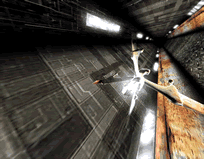 The
scenes 3,5 and 6 stress the card's 3D particle and polygon processing. Particles
are widely used in games and you
see them for example when you fire with a laser beam or when you light
up a torch.
The
scenes 3,5 and 6 stress the card's 3D particle and polygon processing. Particles
are widely used in games and you
see them for example when you fire with a laser beam or when you light
up a torch.
All 3 scenes are made with a particle system that stresses
the card's polygon count and video memory. The spaceship you see in the picture
is made of a very large number of polygons.

Sapphire
still posing first. Perhaps the R9800 XT finds it difficult when processing
too many polygons in textures. Here the GeForce cards show their
presence.
- Category 3
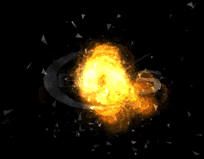 The
third category sum up scenes 4,10 and 11 that render the blending ability
of the card. Blending is the mixture of the graphic layers that result in
complicated textures and effects.
The
third category sum up scenes 4,10 and 11 that render the blending ability
of the card. Blending is the mixture of the graphic layers that result in
complicated textures and effects.
The fillrate of each card is also stressed
in these scenes. So this test should be a reference of the quality of each
card.

Although
the Radeon XT has the highest pixel fillrate, it came second behind the Sapphire
Pro model.
- Category 4
 Scenes
2 and 7 that constitute this category have to do with multitexturing effects.
Multitexturing is the process of applying two or more textures to a single
polygon or pixel, in order to provide spectacular images.
Scenes
2 and 7 that constitute this category have to do with multitexturing effects.
Multitexturing is the process of applying two or more textures to a single
polygon or pixel, in order to provide spectacular images.
Scene 8 uses a
sphere map that is mixed to a simple texturing technique in order to give
reflection effects. Just to know, the reflection and shadow effects you see
in games are being accumulated by the stencil buffer

Interesting.
GeForce FX chipsets are better that Radeon when simulating shadows and reflections.
- XS Marks
The XS Marks is the score of the GL Excess benchmark. Keep
in mind that this score doesn't sum up the results of all 12 scenes. Also
it can be posted on the GL Excess website to compare it with other scores.

Definitely Sapphire is the winner of this test. It seems that
the R9800 Pro Ultimate model can process OpenGL applications with flying
colors! GL Excess marked the end of the synthetic benchmarks.
Next comes the game benchmarking process.
10. Farcry & Painkiller tests
Farcry
 You
are Jack Carver running your own boat charter business in beautiful Micronesia.
With a past best left behind you, you'll be focusing on your present assignment:
escorting an ambitious journalist named Valerie Cortez to the Island of Cabatu.
It seems like a piece of cake, but you'll soon learn: paradise can be hell.
You
are Jack Carver running your own boat charter business in beautiful Micronesia.
With a past best left behind you, you'll be focusing on your present assignment:
escorting an ambitious journalist named Valerie Cortez to the Island of Cabatu.
It seems like a piece of cake, but you'll soon learn: paradise can be hell.
Farcry is an awesome First Person Shooter (FPS) based on a last generation
3D engine named as CryEngine. Real-time editing, bump-mapping, static lights,
network system, integrated physics system, shaders, shadows and a dynamic
music system are just some
of the state of-the-art features that the CryEngine offers.
A
great advantage and strong point of the CryEngine is its physics system
which supports character inverse kinematics, vehicles, rigid bodies, liquid,
rag doll, cloth and body effects. All physics
seem to be very realistic and you never get bored when facing enemies,
since character
models have multiple animations that blend in believable ways.
With an integrated shader system and a massive terrain which maximizes
the view distance to 2km these features make Farcry a perfect action game and
also a referable benchmark to speak of.
- Benchmark Settings
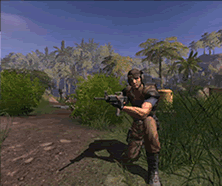 We
made are own demo with Farcry for benchmarking the VGA cards. For the demo
we picked the Fort map and based the character on the top of the mountain
where the whole island can been viewed in an unbelievable distance of about
2kilometers.
It's really a stressful benchmark for VGA cards since we used the high
quality settings for all tests.
We were careful
not
to use
many
bots because the advanced AI system of the game consumes much CPU power.
We
made are own demo with Farcry for benchmarking the VGA cards. For the demo
we picked the Fort map and based the character on the top of the mountain
where the whole island can been viewed in an unbelievable distance of about
2kilometers.
It's really a stressful benchmark for VGA cards since we used the high
quality settings for all tests.
We were careful
not
to use
many
bots because the advanced AI system of the game consumes much CPU power.
The resolutions we run the demo on are the following: 1024x768, 1280x1024
and 1600x1200. The first test was committed with Anti Aliasing (AA) and Anisotropic
Filtering (AF) features off. In the second test we leveled up AA at 4x
and
AF at 8x. Keep in mind that this test is the most stressful of our whole
game benchmarks series.

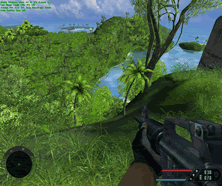 Even
at the 1600x1200 resolution the Exair R9800 XT is on top. The 9800 Pro model
comes next and the GeForce models follows. A bug was encountered
on the 1024x768 resolution with the GeForce series. Some textures had some
other irritating colors as well as some particles occurred. We hope that
an update of the game will fix that problem.
Even
at the 1600x1200 resolution the Exair R9800 XT is on top. The 9800 Pro model
comes next and the GeForce models follows. A bug was encountered
on the 1024x768 resolution with the GeForce series. Some textures had some
other irritating colors as well as some particles occurred. We hope that
an update of the game will fix that problem.
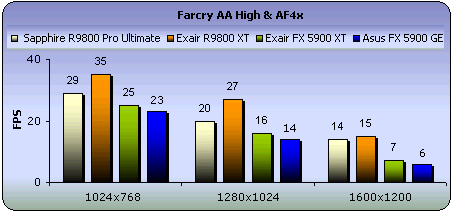
With
the AA and AF settings on, the R9800 XT continuous its lead. However we were
disappointed by the results of the GeForce VGA cards showing only
13-16 fps in 1024x768 and 1280x1024 resolutions. Keep in mind though that
the game's engine has great requirements. Also all stages include a great
deal
of textures and particles (trees, bushes) as you can see from the screenshot.
Imagine processing those textures with Anisotropic Filtering at 4x as we
did. Of
course a very
strong GPU is needed if you have the funny idea to enable AA and AF.
- Painkiller
 You play as Daniel Garner, a seemingly regular guy who has
just been killed in a horrific car accident. Trapped in a dark and unwelcoming
world between heaven and hell, you struggle to uncover the reasons why you've
been denied entry into heaven. Awaiting your purification, you must fight
through an endless number of demon soldiers as you attempt to stop an imminent
unholy war.
You play as Daniel Garner, a seemingly regular guy who has
just been killed in a horrific car accident. Trapped in a dark and unwelcoming
world between heaven and hell, you struggle to uncover the reasons why you've
been denied entry into heaven. Awaiting your purification, you must fight
through an endless number of demon soldiers as you attempt to stop an imminent
unholy war.
If I was told to describe the game in a few words, I would just say "action
in its all magnificence". Painkiller it's a FPS, but totally different
from other of its kind like Farcry. You see in Painkiller you don't have
to use
any stealth or tactical abilities. You only shoot and run. An interesting
feature of the game is that always you will be outnumbered and surrounded
by hordes of enemies. Definitely a pure action game.
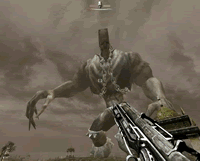 Pinkiller's 3D engine, named PAIN Engine, puts out an unbelievably
high polygon count, while adding increased texture quality and the latest
lighting and shadowing techniques, including soft shadows, DOT3 bump mapping,
water reflections, glass simulation, volumetric light and fog, and more.
Pinkiller's 3D engine, named PAIN Engine, puts out an unbelievably
high polygon count, while adding increased texture quality and the latest
lighting and shadowing techniques, including soft shadows, DOT3 bump mapping,
water reflections, glass simulation, volumetric light and fog, and more.
The game features 24 single-player levels, each one made by an average 350,000
polygons. The game boss monsters are massive made of 8000+ polygons and 2x2048x2048
textures. Enemies also have advanced bump-mapping and lighting models including
specular lighting.
- Benchmarking Settings
To test the VGA cards on Painkiller, we recorder a time demo
on the Psycho deathmatch stage. We used a multiplayer stage since this was
the only way to record a time demo. After this we grabbed the average FPS
on the following resolutions: 1024x768, 1280x1024 and
1600x1200. The first test was committed with Anti Aliasing (AA) and Anisotropic
Filtering (AF) features off. In the second test we leveled up AA at 4x and
AF at 8x.

Many
frames for all resolutions. At 1600x1200 things start to clear out. With
an average of 75 fps, Exair's R9800 XT is first, Sapphire's R9800
Pro second, and with almost identical fps the GeForce cards follow.

Same
results with Anti Aliasing and Anisotropic filtering on. Again Sapphire's
Pro model is as good as the XT, on the 1024x768 resolution. A minor drop
of fps follows on the other 2 resolutions resulting 41 fps at 1600x1200.
Not bad at all having in mind the AA & AF high quality settings are
on. Till now Farcry and Painkiller indicated the same thing with similar
fps.
11. Unreal Tournament 2004 & 2003 tests
Unreal Tournament 2004
Unreal
Tournament 2004 is a multiplayer first person shooter that combines the kill-or-be-killed
experience of gladiatorial combat with cutting-edge
technology.
 Ten game modes - both team-based and "every man for himself" --
provide even the most hardcore gamer with palm-sweating challenges through
unbelievably detailed indoor arenas and vast outdoor environments.
Ten game modes - both team-based and "every man for himself" --
provide even the most hardcore gamer with palm-sweating challenges through
unbelievably detailed indoor arenas and vast outdoor environments.
As the
ultimate techno-gladiator of the future, players will take their fates
into their hands, battling against up to 32 other players online in action-packed,
frag-filled arenas
- Unreal Tournament 2004 Benchmark
 Many new features and maps are available in Unreal T. 2004.
Also the gameplay has changed in many of its game types. For example there
is the Onslaught
game type where you have to take over the enemy base using warmachines and
vehicles in a massive map. For this reason we included an Onslaugh and
a Capture The Flag (CTF) map.
Many new features and maps are available in Unreal T. 2004.
Also the gameplay has changed in many of its game types. For example there
is the Onslaught
game type where you have to take over the enemy base using warmachines and
vehicles in a massive map. For this reason we included an Onslaugh and
a Capture The Flag (CTF) map.
As with the other games we conducted the benchmark using
our timedemos in the 1024x768, 1280x1024 and 1600x1200 resolutions. All tests
were done with the maximum detail settings selected. 2 bots were used on
the Ons-Torlan map and 8 bots on the CTF-Bridge of Fate map. First let's
see the Onslaught game type test on the Torlan map.
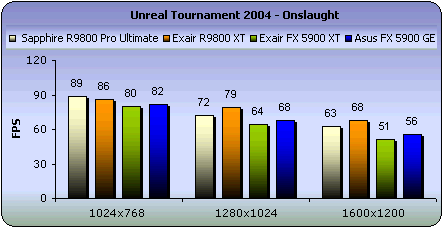
Good results for all cards. On the 1600x1200 resolution though,
things start to clear out. R9800 XT comes first with 68 fps and slightly
back it's Sapphire's Ultimate model. GeForce cards follows with approximately
10 fps difference.

Setting
the Anti Aliasing and Anisotropic Filtering on all cards depleted their fps
specially in the 1600x1200 high defined resolution. We should
mention here that Sapphire's card performed as good as its big brother
R9800 XT. Also Asus' 5900 GE showed more stable results with average fps
taking the 3rd place.
Also Unreal T. 2004 has the classic CTF game type, which is
the most favorite of many gamers. So we could 't just ignore it, but we included
in the tests grabbing the average fps on the Bridge of Fate CTF map.

Minor
performance differences for all cards. It seems that Unreal T. 2004 is easy
for video cards to render. Let's see what happens when enabling
AA and AF quality settings.

Now
we have a more clear picture. As usual R9800 XT is first, but we were impressed
with Asus performance specially at the 1600x1200 resolution.
- Unreal Tournament 2003
 In
the latest Unreal Tournament series, the player models contain a very high
polygonal count. They are extremely detailed from the heads to
the feet
and
they all
look
totally
different from all the other players. The character animations are the most
impressive. From running, jumping, and all the death animations.
In
the latest Unreal Tournament series, the player models contain a very high
polygonal count. They are extremely detailed from the heads to
the feet
and
they all
look
totally
different from all the other players. The character animations are the most
impressive. From running, jumping, and all the death animations.
Thanks to
the new karma psychics system, every death is handled in a different way
that corresponds to the surrounding environment. If players are shot with
a rocket, they will be on fire, or if they die and are on the edge of a
cliff, they will roll down according to the bumps of the cliff.
- Unreal Tournament 2003 Benchmark
To test the Unreal T. 2003 we used the deathmatch map dm-antalus
with 5 bots. Below you can see the average fps resulted with the same resolutions
and quality settings used in UT 2004.

Similar
average frames per second for all cards with a slight lead of Exair's R9800
XT.

At
1024x768 for the first time in the whole benchmark series the R9800 XT comes
last.
Perhaps a bug could have caused this minor fallback. But later on it takes
the lead again leaving behind the Radeon Pro and the almost identical GeForce
cards.
12. Halo & Tomb Raider:AOD tests
HALO
 Halo is a sci-fi shooter that takes place on a mysterious alien ring-world.
Packed with combat, Halo will have you battling on foot, and in vehicles, inside
and outdoors with Alien and Human weaponry. Your objective: to uncover Halo’s
horrible secrets and destroy mankind’s sworn enemy, the Covenant.
Halo is a sci-fi shooter that takes place on a mysterious alien ring-world.
Packed with combat, Halo will have you battling on foot, and in vehicles, inside
and outdoors with Alien and Human weaponry. Your objective: to uncover Halo’s
horrible secrets and destroy mankind’s sworn enemy, the Covenant.
The game supports the latest shader technology of pixel shaders 2.0. Of course
the graphics are somewhat better on PC than Xbox, since most of the game's
shader effects have been redesigned to support the latest 2.0 shaders in DX9.
Having that there are few games supporting 2.0 pixel shaders, Halo
is a good test for VGA cards performance on the shader technology.
A minor disadvantage of the game is its lack of Anti Aliasing and Anisotropic
Filtering support. If you get the funny idea to enable these settings via the
control panel of your card, you will experience no difference in graphics quality
as well as this would slow things down and lose performance.
Halo also supports pixel shaders 1.1 that offer better performance in the
cost of quality.
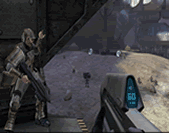 - Halo Benchmark
For the Halo benchmark we the default settings with pixel shaders 2.0
in the following resolutions: 1024x768, 1280x1024 and the awesome 1600x1200.
We used the -timedemo command to run the default benchmark.

The "halo" of
pixel shading belongs to ATI chipsets. On the web there are benchmark results
with Halo, with ATI showing double fps that Nvidia's
cards with previous drivers. It seems seems that the 52.xx (Detonator 50) drivers
boost up its performance on pixel shading rendering. But let's see also an
other game that use Pixel shaders 2.0 on a high extent.
- Tomb Raider : Angel of Darkness
 A series of grisly murders brings Lara into conflict with a sinister Alchemist
from the past, and a secret alliance of powerful individuals shrouded in
mystery. Accused of the murder of her one time mentor, Werner Von Croy, Lara
becomes a fugitive on the run. Pursued by the police, she follows the Alchemist
into a dark world of blood, betrayal
and vengeance where it is up to her to defeat this unholy alliance, and stop
them from unleashing their incredible powers on the world.
A series of grisly murders brings Lara into conflict with a sinister Alchemist
from the past, and a secret alliance of powerful individuals shrouded in
mystery. Accused of the murder of her one time mentor, Werner Von Croy, Lara
becomes a fugitive on the run. Pursued by the police, she follows the Alchemist
into a dark world of blood, betrayal
and vengeance where it is up to her to defeat this unholy alliance, and stop
them from unleashing their incredible powers on the world.
Angel of Darkness employs a brand new engine with Lara now made up of over
5,000 polygons as opposed to just 500 in previous Tomb Raider games. The range
of special effects create a batch of cool visuals.
From the many kinds of water
(mercurial liquid forms, good surface texturing, and realistic pools of water)
to fire (heat blurs and colorful fiery pits), to the game's many light effects
(lots of shadowing, multiple light sources and effective reflections), Core
mixes more realistic settings with special effects to create a well-rounded
whole. It is wothmentioning though that Tomb Raider: AOD uses pixel shader
2.0 technology on a higher extent than Halo does.
- Tomb Raider:AOD Benchmark
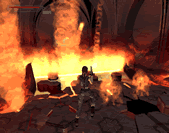 To
test the VGA cards with AOD we used a timedemo on the Paris stage. The particular
room where the timedemo was recorder, is full with
complicated fire effects). This benchmark stresses a lot the cards' pixel shading
processing, we believe that this is the ultimate pixel shader 2.0 game benchmark.
To
test the VGA cards with AOD we used a timedemo on the Paris stage. The particular
room where the timedemo was recorder, is full with
complicated fire effects). This benchmark stresses a lot the cards' pixel shading
processing, we believe that this is the ultimate pixel shader 2.0 game benchmark.
We
grabbed the fps from the timedemo twice. Once with the Anti Aliasing and Anisotropic
Filtering off (Trillinear was used), and once more
with AA at 4x and Anisotropic Filtering just enabled.

Even with the high quality settings off the difference is clearly
visible. As Halo indicated, ATI previous generation chipsets are far better
processing
pixel
shaders.

With
the quality settings enabled all cards lost a high extent of their performance.
At the 1600x1200 the ATI cards dropped dramatically 15 fps as the GeForce
FX cards had a 9 fps difference which shows that GeForce cards are more stable
between resolutions.
13. Overclocking
OVERCLOCKING CAPABILITIES
- ATI overclocking
 We
used ATI Tool for leveling up the clock speeds and checking the effectiveness
of each Radeon card. We highly recommend ATITool for both
beginners and hardcore overclockers.
We
used ATI Tool for leveling up the clock speeds and checking the effectiveness
of each Radeon card. We highly recommend ATITool for both
beginners and hardcore overclockers.
The
ATI Tool has a 3D interface (pic on the left) with which you can test the correspondence
and success of each overclock adjustment you applied. After setting a clock
speed of either core or memory, then by clicking on the test button, the program
scans
for
artifacts on its cubic 3D interface.
You can continue the scanning for as long
as you like and we recommend to keep it running for 30 minutes minimum. If
any errors or artifacts occur then just lower the speeds by 10 or 15 Mhz
until you reach a no error state.

The main window of ATITool
- NVidia overclocking
Things are different with the NVidia cards. You see there is
no any Nvidia exclusive tool for overclocking but RivaTuner can be used to
adjust your card's clock speeds. However the same can be done via NVidia's
control panel after having applied a patch that reveals the hidden features.
We don't recommend this because it won't let you adjust the clock speeds as
high as you want. We should note here that GeForce cards after reaching a
specific temperature value the default clock speeds are restored after having
restarted
your system. This of course is being done without the confirmation of the
user, so always double check if the clock speeds are those you entered.

Riva Tuner control panel
Unfortunately RivaTuner don't have an artifact scaning
feature so we had to check for artifacts and instabilities manually. All
tests for
verification a successful overclock were done manually using 3DMark, Codecreatures,
Farcry, Halo
and Unreal Tournament 2004.
The default values of the core and memory clock frequencies of
each card, and the achieved overclocked frequencies are shown in the following
table:
| |
Default speeds
|
Overclocked Speeds
|
Model
|
Core
|
Memory
|
Core
|
Memory
|
Sapphire R9800 Pro Ultimate 128
|
380
|
680
|
440
|
700
|
Exair R9800 XT 256
|
412
|
730
|
450
|
740
|
Exair GeForce FX 5900XT 128
|
400
|
700
|
450
|
720
|
Asus GeForce FX 5900 128
|
400
|
700
|
475
|
730
|
- Overclocking Sapphire R9800 Pro Ultimate 128
As mentioned before Sapphire's R9800 Pro Ultimate model has its memory
clock speed underclocked to 680Mhz and it's core to 380. As referred
on the first page, the Ultimate series are equipped
with
a massive heat sink solution. The reason is to substitute the fan resulting
in a soundless VGA card. So the underclock was done to protect the chipset
from overheating.
To be honest I didn't expect to achieve high overclocking speeds. But I was
wrong since the card performed flawlessly after having overclocked it at 440
for its core clock and 700 for its memory. Having in mind that its default
clock speeds are 380 and 680 for core and memory respectively, this is a very
good overclock level after all.
Below we grabbed some fps with Farcry and Unreal 2004 to see the performance
difference.

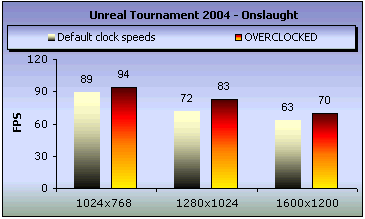

Somewhat noticeable performance difference specially with Unreal
Tournament 2004 with 10 frames higher. In farcry and Halo you will not notice
the difference after having overclocked the card.
- Overclocking Exair R9800 XT 256
As referred the Radeon 9800 XT is the Pro model but with higher
clock speeds. Well, we tried to push the speeds a little more higher and we
achieved overclocking the card at 450Mhz for the core and 740Mhz for memory.
Radeon's 9800 XT default values are 412Mhz and 730Mhz for core and memory respectively.
Have a look on the following charts to see the difference.


Although 3DMark, Farcry and Unreal Tournament 2004 were played
flawlessly without any artifacts, in Halo we experienced
some irritating
triangles
coming
from
nowhere.
Thus, we recommended to low down the clock speeds
when playing Halo and games that support pixel shaders 2.0 in high extent.
- Overclocking Exair GeForce FX 5900XT 128
The default clock speeds of the GeForce FX 5900 XT are 400 and
700 for core and memory. We managed to reach 450 for the core and 720 for the
memory.


Slight performance difference on Halo and Farcry, but Unreal
tournament on 1024x768 resolution with Anti Aliasing at 4x and Anisotropic
Filtering at 8x showed an impressive 13 fps score.
- Overclocking Asus GeForce FX 5900GE 128
As the XT model Asus GeForce FX 5900GE runs at the same 400/700
(core/memory) speeds. But the overclocking we achieved with this card at 475/730
(core/memory) is somewhat higher than the one achieved with the XT. We were
surprised with such high a core speed worked.
Now let's see if the performance justifies our surprisment.


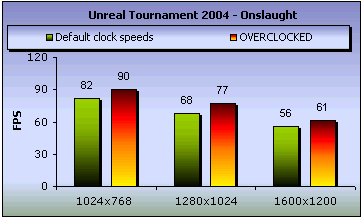
Indeed,
Asus GeForce FX 5900GE is really apt on overclocking. Good fps achieved with
Farcry too.
14. Conclusion
Conclusion
-RADEON
9800 XT 256MB
Yes,
Exair's Radeon 9800 XT is definitely the best card from the other series we
tested. Unfortunately it can not be found less than
$390 (320 euro) remaining unaffordable for the mid-user. Despite the release
of the
next generation
VGA
cards (X800 and 6800), the price of the R9800 XT is still high. We expect this
to change since ATI's X800 chipset will are to substitute the R9800 ones.
Of course this card is referred to the power user who have no problem giving
something more to have a top notch VGA card in his system. Also some good overclocking
speeds were achieved resulting to even better performance and higher fps.
-
RADEON 9800 PRO ULTIMATE ATLANTIS 128MB
If the silent operation is an important factor to you
in purchasing a video card, but you are not disposed to compromise much performance,
then Sapphire's Radeon 9800 PRO Ultimate represents at the moment the ideal
VGA card for you.
As for the performance, using the Pro GPU, is not as good as the R9800 XT.
We mentioned before that the Ultimate version differentiates from the Pro for
its heatsink solution. An other minor difference from the plain Pro model is
that the Ultimate version is underclocked
at 680 Mhz memory from the 700 Mhz the Pro model is.
Keep in mind
though that if you wish to overclock this card you will definitely need an
efficiently ventilated cooling case. Though we recommend not to
overclock the card, since you won't
experience any big difference on its performance. If you like playing with
fire and overclocking is your life then this card it's not for you. But if
you are a movie fan or someone who spend many hours in front of his PC and
finds
the
fan noise
irritating then Sapphire's Ultimate series are just for you.
There is a 256 MB version of this card available on the market. The prices
of both 128 and 256MB models are over $420 (344 euro).
- GEFORCE FX 5900 XT 128MB
Exair's
FX 5900 card is definitely a good affordable product for everyone. Although
it didn't catch up with the ATI chipsets we tested,
it managed though to keep a quite acceptable fps record. We found the card
with less than $190 (156 euro), and that makes it a very affordable product.
Overclockers might not be very satisfied with Exair's FX 5900XT
after we managed to overclock the card only 50Mhz more for the core and 20
more for memory. Keep in mind that the XT versions are lighter than
the normal GeForce FX 5900. This is not the case with ATI's XT series
since Radeon XT cards are a lot better than its non-XT models.
So use discrimination when shopping video cards.
- ASUS V9950 FX 5900 GE 128MB
We
expected much from the Asus FX5900 Gamer's Edition, but unfortunately it didn't
meet our expectations. According to the game benchmarks, it seems
that the GE series performs like the XT versions. Having this in mind this
card is for the gamer who wants a fair solution for his system. But to be fair,
although FX 5900 GE didn't perform as good as the ATI video cards, it showed
satisfying fps at the medium resolutions. The strong points of this card is
that its ships with an incredible software and game bundle at the affordable
price
the XT
version
has.
An other strong point of the card is its high overclocking capabilities.
As you saw V9950 FX 5900 GE was successfully overclockable at 475Mhz for its
core! This is truly a very good core clock speed and resulted in a noticeable
performance increase. In our opinion it should be named Overclocker edition
than Gamer edition...