Breaking News

SWIT Packs 210Wh and 200W Output into Compact MINO-A Gold Mount Battery Series Fanatec and Trak Racer showcase the future of simulation at SimRacing Expo Frankfurt 2026 Razer Unveils the Barracuda V2 Pro ASUS Republic of Gamers Announces Bulwark Dock DG310 Akasa Announces Fermi CM5 Fanless Case for Raspberry Pi Compute Module 5

logo

  • Share Us
    • Facebook
    • Twitter
  • Home
  • Home
  • News
  • Reviews
  • Essays
  • About
    • Submit News

    • Contact Us
    • Privacy

    • Promotion
    • Advertise

    • RSS Feed

Search form

Thermaltake Tide Water

May 22,2006 0

3. Installation


Review Pages

1. Introduction
2. A Closer Look
3. Installation
4. Performance
5. Conclusion


For out tests, we used an 7800GTX graphics card from ASUS. The specific model comes from the factory, with a great cooling system, designed by Arctic Cooling, already installed.

First, uninstall all components of the stock cooling system.
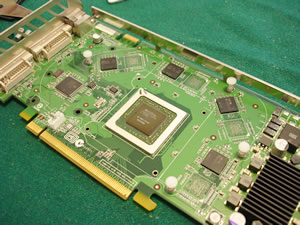
Mount the aluminium heatspreaders on the memory chips, as shown below. The heatspreaders already have an adhesive compound on them, so its a simple matter to mount them.
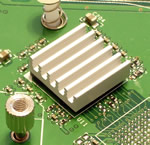
Next, come the screws and metal bracket, which will hold the copper waterblock They should look something like the following images.

The metal bracket is a must for the installation, in order for the copper waterblock to sit tightly.

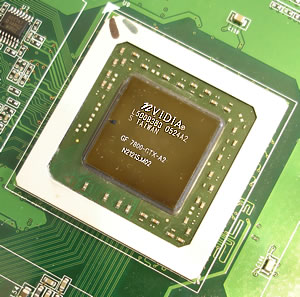
Apply the thermal compound to the NVidia GPU chip...

...and place the copper waterblock on it. The pipes should be on the upper side so you don't have any problems later, inside the PC case. You'll need to loosen the metal brackets on the copper waterblock and adjust them so that they fit on the mounting screws.

Installation of the Tide Water copper waterblock on the VGA card is finished. It is not too difficult, but it does require a little patience and caution, in order not to damage your valuable graphics card.

In order to install the Tide Water cooler inside your case, you'll need two free PCI slots. You can place the Tide Water cooler next to the graphics card.

In our case, there was contact between the VGA card and the Tide Water solution, which wouldn't allow the VGA to sit straight. For this reason, we placed the Tide Water cooler one more PCI slot away for more space.

Our VGA card, like many other cards, has a double width mounting bracket, something that makes things a little difficult for the Tide Water cooler. If you can get a single width mounting bracket, it would be more convenient.


Review Pages

1. Introduction
2. A Closer Look
3. Installation
4. Performance
5. Conclusion


Pages

  • « first
  • ‹ previous
  • 1
  • 2
  • 3
  • 4
  • 5
  • next ›
  • last »

Thermaltake

Tags: Thermaltake
Previous Post
Mushkin XP2-6400
Next Post
ASUS P5WD2-E Premium

Related Posts

  • Thermaltake Launches AW360/420 AIO Liquid Cooler and WAir CPU Cooler for Workstations

  • Begin the Racing Journey with the Thermaltake GR300 Racing Simulator Cockpit

  • Thermaltake Unveils the Massive EXTREME with Cross-flow Fan

  • Thermaltake Releases the Toughpower TF3 1300W with Support for RTX50 Series GPUs

  • Thermaltake Unveils G6 Direct Drive Racing Wheel Bundle and GM5 3DOF Motion System

  • Thermaltake Launches the TT150 LED Bag in Different Sizes and New Colors

  • Thermaltake New TH V2 Ultra EX ARGB Sync AIO – Snow Edition is Now Available Worldwide

  • Thermaltake Coolers Support New-Gen Intel and AMD CPUs

Latest Reviews

Fanxiang MP83 M.2 NVMe SSD Enclosure
Enterprise & IT

Fanxiang MP83 M.2 NVMe SSD Enclosure

Ugreen CM642 USB4.0 Enclosure
PC components

Ugreen CM642 USB4.0 Enclosure

be quiet! Dark Power 14 IO
PC components

be quiet! Dark Power 14 IO

SanDisk High Endurance 512GB microSDXC
Cameras

SanDisk High Endurance 512GB microSDXC

Samsung PRO Ultimate 512GB microSDXC
Cameras

Samsung PRO Ultimate 512GB microSDXC

Popular News

MSI’s Latest AMD X870E MAX & EVO Series Motherboards

MSI’s Latest AMD X870E MAX & EVO Series Motherboards

COLORFUL Launches iGame B850M ULTRA Series Micro-ATX Motherboards

COLORFUL Launches iGame B850M ULTRA Series Micro-ATX Motherboards

COLORFUL Presents Limited Edition Chitu MAG-60 Magnetic Keyboard Inspired by the Year of the Horse

COLORFUL Presents Limited Edition Chitu MAG-60 Magnetic Keyboard Inspired by the Year of the Horse

COLORFUL Launches iGame B850I MINI OC V14 Motherboard

COLORFUL Launches iGame B850I MINI OC V14 Motherboard

COLORFUL Launches the iGame X870E VULCAN W OC Motherboard

COLORFUL Launches the iGame X870E VULCAN W OC Motherboard

COLORFUL Presents iGame Z890 ULTRA-S W and iGame Z890M ULTRA Z Motherboards

COLORFUL Presents iGame Z890 ULTRA-S W and iGame Z890M ULTRA Z Motherboards

COLORFUL Expands B850 Motherboard Lineup with New CVN, Battle-Ax, and MEOW Models

COLORFUL Expands B850 Motherboard Lineup with New CVN, Battle-Ax, and MEOW Models

ASRock Adds Support for One Sub-Channel DRAM Module on Intel DDR5 Motherboards

ASRock Adds Support for One Sub-Channel DRAM Module on Intel DDR5 Motherboards

Main menu

  • Home
  • News
  • Reviews
  • Essays
  • About
    • Submit News

    • Contact Us
    • Privacy

    • Promotion
    • Advertise

    • RSS Feed
  • About
  • Privacy
  • Contact Us
  • Promotional Opportunities @ CdrInfo.com
  • Advertise on out site
  • Submit your News to our site
  • RSS Feed