Breaking News

Fanatec and Trak Racer showcase the future of simulation at SimRacing Expo Frankfurt 2026 Razer Unveils the Barracuda V2 Pro ASUS Republic of Gamers Announces Bulwark Dock DG310 Akasa Announces Fermi CM5 Fanless Case for Raspberry Pi Compute Module 5 LG Electronics Advances the LG Sound Suite Experience With New DTS

logo

  • Share Us
    • Facebook
    • Twitter
  • Home
  • Home
  • News
  • Reviews
  • Essays
  • About
    • Submit News

    • Contact Us
    • Privacy

    • Promotion
    • Advertise

    • RSS Feed

Search form

Sony SCD-XB790 SACD Player

Feb 18,2005 0

4. Control Menu


Review Pages

1. Intorduction
2. The Super Audio CD Format
3. Unpacking
4. Control Menu
5. Reading Tests
6. Error Correction Tests
7. Conclusion


Sony SCD-XB790 SACD Player - Page 4

Control Menu

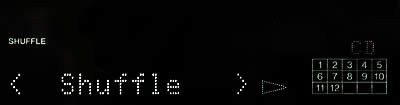
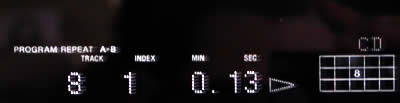
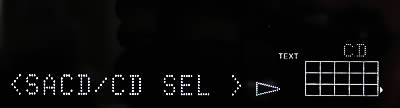
Some screenshots from the player's menu can be seen below:
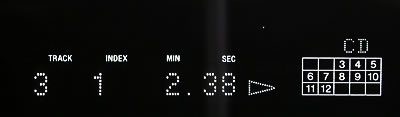

CD reproduction
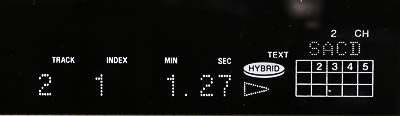

SACD 2CH reproduction


SACD MCH reproduction
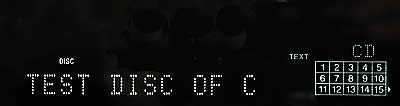
CD-Text


90min Test Disc


99min Test Disc


Shuffle
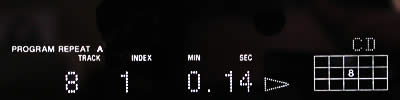
Program function with A-B repeat feature

- Menu

From "MCH SPK MODE" in the Menu, with SACD enabled, you can select your preference from among 7 settings. These are:

Playback Mode Front Speakers Center Speaker Surround Speakers Sub woofer
MCH Direct Each signal outputs directly from each speaker
5-Large + SW Large Large Large Yes
5-Large Large Large Large No
5-Small + SW Small Small Small Yes
FRT-Large + SW Large Small Small Yes
FRT-Large Large Small Small No
No-CNTR + SW Large No Large Yes
No-CNTR Large No Large No

For example:

When MCH is enabled, a light located at top center turns blue to indicate this condition.
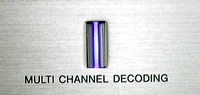
The balance is fully adjustable: (e.g. between the front and rear, the Sub woofer, etc). Some screenshots below:

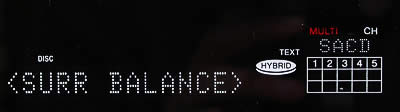
If the unit is set to "2CH SPK MODE", there are two available settings:

Playback Mode Front Speakers Sub woofer
2CH Direct Each signal outputs directly from front speakers. No signal outputs from the Sub woofer.
2CH + SW Yes Yes

Navigating through the menus is simple. Of course you'll need to spend some time to learn how to use it but the included manual will help you at every step.


Review Pages

1. Intorduction
2. The Super Audio CD Format
3. Unpacking
4. Control Menu
5. Reading Tests
6. Error Correction Tests
7. Conclusion


Pages

  • « first
  • ‹ previous
  • 1
  • 2
  • 3
  • 4
  • 5
  • 6
  • 7
  • next ›
  • last »

Sony

Tags: Sony
Previous Post
SONY BW-RU101 PDD
Next Post
Aopen vs Toshiba

Related Posts

  • Sony Announces the World's First Eclipsa Audio Certified Microphone1 for Smartphones

  • Sony Introduces New Colour to INZONE H9 II Headset and INZONE E9 In-ear Headphones

  • Sony Rewrites the Rules of Super-Telephoto: Announces World's Lightest 400mm and 600mm G Master Primes

  • Sony Expands its ULT POWER SOUND series Lineup with 3 New Bass-Powered Speakers

  • Sony Launches ‘FE 100-400MM F5.6-8 OSS

  • Sony Launches FX5 Camera

  • Sony announces RX10V

  • Sony Semiconductor Solutions to Release Advanced 1/2-type CMOS Sensor for Mobile Applications

Latest Reviews

Fanxiang MP83 M.2 NVMe SSD Enclosure
Enterprise & IT

Fanxiang MP83 M.2 NVMe SSD Enclosure

Ugreen CM642 USB4.0 Enclosure
PC components

Ugreen CM642 USB4.0 Enclosure

be quiet! Dark Power 14 IO
PC components

be quiet! Dark Power 14 IO

SanDisk High Endurance 512GB microSDXC
Cameras

SanDisk High Endurance 512GB microSDXC

Samsung PRO Ultimate 512GB microSDXC
Cameras

Samsung PRO Ultimate 512GB microSDXC

Popular News

MSI’s Latest AMD X870E MAX & EVO Series Motherboards

MSI’s Latest AMD X870E MAX & EVO Series Motherboards

COLORFUL Launches iGame B850M ULTRA Series Micro-ATX Motherboards

COLORFUL Launches iGame B850M ULTRA Series Micro-ATX Motherboards

COLORFUL Presents Limited Edition Chitu MAG-60 Magnetic Keyboard Inspired by the Year of the Horse

COLORFUL Presents Limited Edition Chitu MAG-60 Magnetic Keyboard Inspired by the Year of the Horse

COLORFUL Launches iGame B850I MINI OC V14 Motherboard

COLORFUL Launches iGame B850I MINI OC V14 Motherboard

COLORFUL Launches the iGame X870E VULCAN W OC Motherboard

COLORFUL Launches the iGame X870E VULCAN W OC Motherboard

COLORFUL Presents iGame Z890 ULTRA-S W and iGame Z890M ULTRA Z Motherboards

COLORFUL Presents iGame Z890 ULTRA-S W and iGame Z890M ULTRA Z Motherboards

COLORFUL Expands B850 Motherboard Lineup with New CVN, Battle-Ax, and MEOW Models

COLORFUL Expands B850 Motherboard Lineup with New CVN, Battle-Ax, and MEOW Models

ASRock Adds Support for One Sub-Channel DRAM Module on Intel DDR5 Motherboards

ASRock Adds Support for One Sub-Channel DRAM Module on Intel DDR5 Motherboards

Main menu

  • Home
  • News
  • Reviews
  • Essays
  • About
    • Submit News

    • Contact Us
    • Privacy

    • Promotion
    • Advertise

    • RSS Feed
  • About
  • Privacy
  • Contact Us
  • Promotional Opportunities @ CdrInfo.com
  • Advertise on out site
  • Submit your News to our site
  • RSS Feed