Breaking News

SAMA Introduces the S32 WOOD, a Compact M-ATX Case Bundled with an 80 PLUS Gold PSU Thypoch Completes Simera-C Cine Prime Lineup with New 100mm T1.9 Lens CORSAIR Launches the RM1200e Power Supply with Built-in PinProtect GPU Overcurrent Protection and Platinum-certified Efficiency CORSAIR Changes the Game with PureVector, a Science-Based Personalized Aiming Technology, Launching Exclusively in the SABRE v3 PRO PureVector Mouse Series AMD FSR Upscaling 4.1 Boosts Frames and Image Quality on More Devices

logo

  • Share Us
    • Facebook
    • Twitter
  • Home
  • Home
  • News
  • Reviews
  • Essays
  • About
    • Submit News

    • Contact Us
    • Privacy

    • Promotion
    • Advertise

    • RSS Feed

Search form

Plextools XL

Mar 2,2005 0

4. The software - Page 1


Review Pages

1. Introduction
2. Installation - Page 1
3. Installation - Page 2
4. The software - Page 1
5. The software - Page 2
6. The software - Page 3
7. The software - Page 4
8. The software - Page 5
9. Conclusion


Plextools XL - Page 4

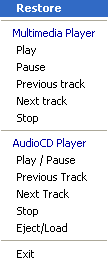
Plextools Professional XL icon immediately appeared in the icons in the task bar:
and at last, we opened for the first time, the new Plextools Professional XL v3.00 (click on the image for a larger view).

Click to enlarge!

As we can see, the new Plextools includes a re-designed interface, separated into three independent windows:

  • The main window.
  • The device window, which contains the hardware device tree for the PC.
  • The functions window shows all available functions used for retrieving information on the drive or disc, the players and recording modules and also includes the test functions.

The device and functions windows can be closed, leaving only the main window available. The main window, from where all devices and functions can be selected, shows information and test results. All 3 windows can be repositioned and resized independently as can be seen below:

Click To Enlarge!

At the top of the main window, the user can access directly, all the major functions and of course, devices:

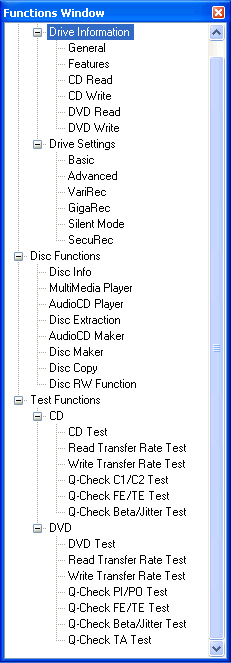
Expanding the Functions window, we can see all the available functions/tests:
The about screen shows the build revision:

 

Review Pages

1. Introduction
2. Installation - Page 1
3. Installation - Page 2
4. The software - Page 1
5. The software - Page 2
6. The software - Page 3
7. The software - Page 4
8. The software - Page 5
9. Conclusion


Pages

  • « first
  • ‹ previous
  • 1
  • 2
  • 3
  • 4
  • 5
  • 6
  • 7
  • 8
  • 9
  • next ›
  • last »

Plextor

Tags: Plextor
Previous Post
Pioneer DVR-109
Next Post
Teac MP-200 MP3 Player

Related Posts

  • Plextor SSD RMA Services Transition to SSSTC Official Website

  • Plextor Unveils M10P Series PCIe Gen4 Solid State Drives

  • Plextor Launches the M9P Plus Series of SSDs

  • LITE-ON Technology Approves the Transfer of its Solid State Drives Business to Toshiba Memory

  • Shinano Kenshi Introduces New ASPINA Corporate Brand

  • PLEXTOR Debuts New Consumer SSDs at CES 2019

  • Plextor Unveils the M9Pe Extreme NVMe SSD at Computex Taipei 2018

  • Plextool NVMe Edition Released

Latest Reviews

be quiet! Light Wings Pro IO fan
Cooling Systems

be quiet! Light Wings Pro IO fan

Why Intelligent Firmware Matters More Than Peak Throughput in NAS Systems
Enterprise & IT

Why Intelligent Firmware Matters More Than Peak Throughput in NAS Systems

Fanxiang MP83 M.2 NVMe SSD Enclosure
Enterprise & IT

Fanxiang MP83 M.2 NVMe SSD Enclosure

Ugreen CM642 USB4.0 Enclosure
PC components

Ugreen CM642 USB4.0 Enclosure

be quiet! Dark Power 14 IO
PC components

be quiet! Dark Power 14 IO

Popular News

MSI’s Latest AMD X870E MAX & EVO Series Motherboards

MSI’s Latest AMD X870E MAX & EVO Series Motherboards

COLORFUL Launches iGame B850M ULTRA Series Micro-ATX Motherboards

COLORFUL Launches iGame B850M ULTRA Series Micro-ATX Motherboards

COLORFUL Presents Limited Edition Chitu MAG-60 Magnetic Keyboard Inspired by the Year of the Horse

COLORFUL Presents Limited Edition Chitu MAG-60 Magnetic Keyboard Inspired by the Year of the Horse

COLORFUL Launches iGame B850I MINI OC V14 Motherboard

COLORFUL Launches iGame B850I MINI OC V14 Motherboard

COLORFUL Launches the iGame X870E VULCAN W OC Motherboard

COLORFUL Launches the iGame X870E VULCAN W OC Motherboard

COLORFUL Presents iGame Z890 ULTRA-S W and iGame Z890M ULTRA Z Motherboards

COLORFUL Presents iGame Z890 ULTRA-S W and iGame Z890M ULTRA Z Motherboards

COLORFUL Expands B850 Motherboard Lineup with New CVN, Battle-Ax, and MEOW Models

COLORFUL Expands B850 Motherboard Lineup with New CVN, Battle-Ax, and MEOW Models

ASRock Adds Support for One Sub-Channel DRAM Module on Intel DDR5 Motherboards

ASRock Adds Support for One Sub-Channel DRAM Module on Intel DDR5 Motherboards

Main menu

  • Home
  • News
  • Reviews
  • Essays
  • About
    • Submit News

    • Contact Us
    • Privacy

    • Promotion
    • Advertise

    • RSS Feed
  • About
  • Privacy
  • Contact Us
  • Promotional Opportunities @ CdrInfo.com
  • Advertise on out site
  • Submit your News to our site
  • RSS Feed