Breaking News

SAMA Introduces the S32 WOOD, a Compact M-ATX Case Bundled with an 80 PLUS Gold PSU Thypoch Completes Simera-C Cine Prime Lineup with New 100mm T1.9 Lens CORSAIR Launches the RM1200e Power Supply with Built-in PinProtect GPU Overcurrent Protection and Platinum-certified Efficiency CORSAIR Changes the Game with PureVector, a Science-Based Personalized Aiming Technology, Launching Exclusively in the SABRE v3 PRO PureVector Mouse Series AMD FSR Upscaling 4.1 Boosts Frames and Image Quality on More Devices

logo

  • Share Us
    • Facebook
    • Twitter
  • Home
  • Home
  • News
  • Reviews
  • Essays
  • About
    • Submit News

    • Contact Us
    • Privacy

    • Promotion
    • Advertise

    • RSS Feed

Search form

OCZ Vertex 60GB SSD

Jul 1,2009 0

3. Flashing the SSD


Review Pages

1. Features
2. The package
3. Flashing the SSD
4. Benchmarks
5. Final thoughts


We installed the OCZ Vertex 60GB SSD to our test PC. The CrystalDiskInfo 2.7.4 software provided the basic information about the drive under Windows Vista. The drive uses 60GB of RAM and supports the S.M.A.R.T., NCQ and "TRIM" technologies.
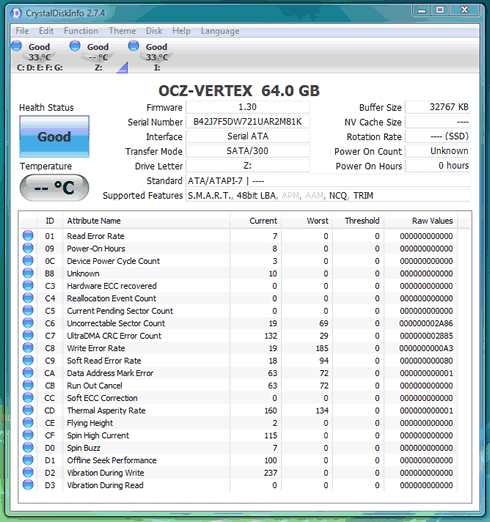
According to Wikipedia, the TRIM command is an instruction issued from the operating system to an SSD. The purpose of the instruction is to maintain the speed of the SSD throughout its lifespan, avoiding the slowdown that early models encountered once all of the cells had been written to on the first pass. Although tools are are available to "reset" drives to a fresh state, they also delete all data on the drive which makes it impractical to use as an optimization. The command is similar to the process of defragmentation on a HDD, except that it occurs on-the-fly instead of running as a dedicated process.

So far no operating system supports the TRIM command. TRIM has already been implemented in Windows 7 release candidate, but until solid state drives are updated with firmware that can understand the command, it will simply be ignored. Although SSD makers have not yet offered support for TRIM, some drives including the OCZ Vertex have a specialized tool called wiper.exe that claims to use TRIM on demand. However, it is actually a specialized defragmentation tool for SSD's (regular defragmentation tools do not work on SSD's). It simply clears unused space, while TRIM actually informs the controller about unused space, allowing the controller to continuously manage resources for best performance:

This utility can be used with limited SSD models.

Just before we had finished the benchmarks for the drive, OCZ Technology released a new firmware revision 1.30 (1571) that was supposed to further increase the drive's performance. Below is the change list according to OCZ:

Bug fixes

  • Host program lost drives if NAND BIST is run on multiple drives.
  • Read Fail handling
  • ATA Security Command didn't’t work as expected.
  • Race condition occurred during soft reset handler
  • ATA Security Command didn't’t work in AHCI mode.
  • If read fail occurs during reading stamp information, firmware corrupted block 0.
  • Power off recovery had bug in certain circumstances
  • If host sends invalid SMART subcommands, Abort was not sent to host.
  • SMART attribute data was not initialized properly for certain fields.
  • Improper handling of ATA command when sent with 0 sector count

Feature Addition

  • Remaining life expectancy calculation is implemented.

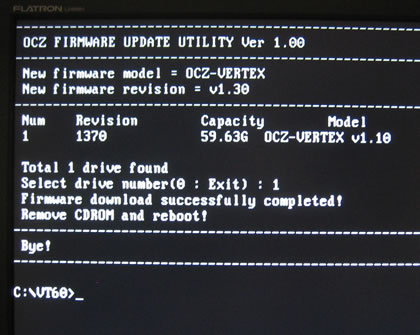
Let's flash the SSD to the new firmware. We begin with the creation of a DOS boot disc. Alternatively you can use the bootable disc that OCZ offers for download. For this upgrade you don't have to use any jumper on the back of the drive, at least if your drive has 1.10 firmware installed.

We start the upgrade procedure with a boot under DOS and a navigation to the VT60 folder:

The next step is to simply run the " fwupdate.exe" file:
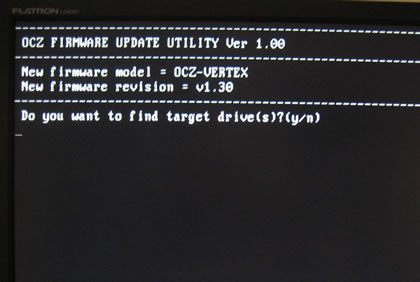
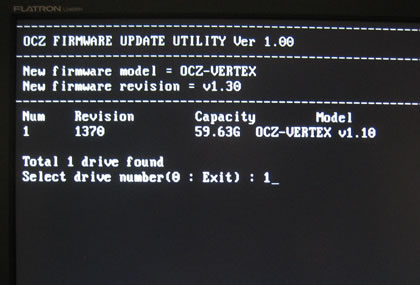
The firmware upgrade takes only a few seconds to complete. Restart the the system and you are ready to go:
With the new firmware installed we fired up the CrystalDiskInfo software again. Nothing has changed as you can see below:
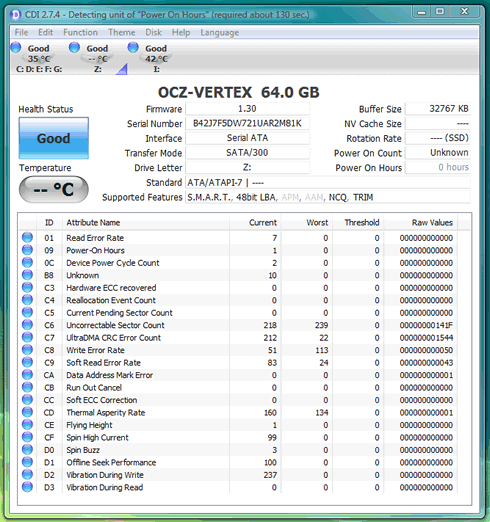
However, after spending some time at OCZ's forums we got some interesting information about some important SMART flags. According to the posts , the D0 and D1 flags do represent something for the SSD users. For example the D0 equals with the Erase count Average, while the D1 equals with the Remaining drive life. If your drive starts to fail, the the D1 value will start to degrade and you will be prompted to backup your data in another storage medium.


Review Pages

1. Features
2. The package
3. Flashing the SSD
4. Benchmarks
5. Final thoughts


Pages

  • « first
  • ‹ previous
  • 1
  • 2
  • 3
  • 4
  • 5
  • next ›
  • last »

OCZ Technology

SSDs

Tags: OCZ Technology SSDs
Previous Post
Shuttle SP-45H7
Next Post
Patriot Torqx 128GB SSD

Related Posts

  • JEDEC Publishes Automotive Solid State Drive (SSD) Device Standard

  • Toshiba completes acquisition of OCZ Technology Group's Assets and launches new subsidiary, OCZ Storage Solutions

  • Crucial launch 500GB & 4TB X6 Portable SSDs

  • Intel Launches SSD for Everyday Computing, Mainstream Gaming

  • Seagate Releases New FireCuda 120 SATA SSD

  • Kingston Ships 7.68TB Capacity for High-Performance Data Center SSDs

  • Lexar Announces New Professional NM700 M.2 2280 PCIe Gen3x4 NVMe SSD

  • Samsung’s T7 Portable SSD Is Now Available for Purchase

Latest Reviews

be quiet! Light Wings Pro IO fan
Cooling Systems

be quiet! Light Wings Pro IO fan

Why Intelligent Firmware Matters More Than Peak Throughput in NAS Systems
Enterprise & IT

Why Intelligent Firmware Matters More Than Peak Throughput in NAS Systems

Fanxiang MP83 M.2 NVMe SSD Enclosure
Enterprise & IT

Fanxiang MP83 M.2 NVMe SSD Enclosure

Ugreen CM642 USB4.0 Enclosure
PC components

Ugreen CM642 USB4.0 Enclosure

be quiet! Dark Power 14 IO
PC components

be quiet! Dark Power 14 IO

Popular News

MSI’s Latest AMD X870E MAX & EVO Series Motherboards

MSI’s Latest AMD X870E MAX & EVO Series Motherboards

COLORFUL Launches iGame B850M ULTRA Series Micro-ATX Motherboards

COLORFUL Launches iGame B850M ULTRA Series Micro-ATX Motherboards

COLORFUL Presents Limited Edition Chitu MAG-60 Magnetic Keyboard Inspired by the Year of the Horse

COLORFUL Presents Limited Edition Chitu MAG-60 Magnetic Keyboard Inspired by the Year of the Horse

COLORFUL Launches iGame B850I MINI OC V14 Motherboard

COLORFUL Launches iGame B850I MINI OC V14 Motherboard

COLORFUL Launches the iGame X870E VULCAN W OC Motherboard

COLORFUL Launches the iGame X870E VULCAN W OC Motherboard

COLORFUL Presents iGame Z890 ULTRA-S W and iGame Z890M ULTRA Z Motherboards

COLORFUL Presents iGame Z890 ULTRA-S W and iGame Z890M ULTRA Z Motherboards

COLORFUL Expands B850 Motherboard Lineup with New CVN, Battle-Ax, and MEOW Models

COLORFUL Expands B850 Motherboard Lineup with New CVN, Battle-Ax, and MEOW Models

ASRock Adds Support for One Sub-Channel DRAM Module on Intel DDR5 Motherboards

ASRock Adds Support for One Sub-Channel DRAM Module on Intel DDR5 Motherboards

Main menu

  • Home
  • News
  • Reviews
  • Essays
  • About
    • Submit News

    • Contact Us
    • Privacy

    • Promotion
    • Advertise

    • RSS Feed
  • About
  • Privacy
  • Contact Us
  • Promotional Opportunities @ CdrInfo.com
  • Advertise on out site
  • Submit your News to our site
  • RSS Feed