Breaking News

SAMA Introduces the S32 WOOD, a Compact M-ATX Case Bundled with an 80 PLUS Gold PSU Thypoch Completes Simera-C Cine Prime Lineup with New 100mm T1.9 Lens CORSAIR Launches the RM1200e Power Supply with Built-in PinProtect GPU Overcurrent Protection and Platinum-certified Efficiency CORSAIR Changes the Game with PureVector, a Science-Based Personalized Aiming Technology, Launching Exclusively in the SABRE v3 PRO PureVector Mouse Series AMD FSR Upscaling 4.1 Boosts Frames and Image Quality on More Devices

logo

  • Share Us
    • Facebook
    • Twitter
  • Home
  • Home
  • News
  • Reviews
  • Essays
  • About
    • Submit News

    • Contact Us
    • Privacy

    • Promotion
    • Advertise

    • RSS Feed

Search form

Latest Microsoft Edge Browser Supports Extensions

Latest Microsoft Edge Browser Supports Extensions

Enterprise & IT Mar 18,2016 0

Microsoft has shipped the first preview release of Microsoft Edge with extensions support to Windows Insiders. Extensions are introduced first to Windows Insiders and then will roll them out more broadly to all Windows 10 users. Initially Insiders will download and then sideload extensions for testing purposes, but ultimately we will make extensions available to all of our customers via the Windows Store.

The Windows Insider build will include three preview extensions: Microsoft Translator, an extension that automatically translates pages in over 50 different languages, a Mouse Gestures extension, and an early preview version of the popular Reddit Enhancement Suite (RES). Later this year Microsoft will also add popular extensions from partners like AdBlock, Adblock Plus, Amazon, LastPass, Evernote and more.

Microsoft said it's taking a slow and steady approach to extensions, simply because poorly coded extensions can be a back door into your browser.
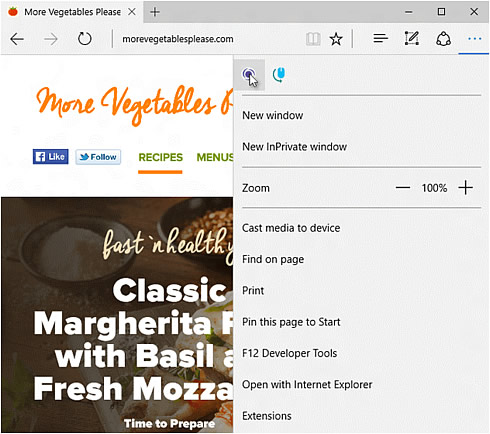
You can download the first preview extensions at Microsoft's extensions page on Microsoft Edge Dev.

In addition to adding extensions to Edge, the browser will now let you pin tabs. The next time you re-open Edge, the pinned tabs will return. Another convenience is "paste and go," so if you copy a URL into the Edge browser, you can launch it without needing to find that pesky Enter key.

Microsoft also rethought Maps app. The most important improvement, is the ability to lace multiple searches on the same map—so you know which "hotels" are near which "restaurants," for example. Those searches will be named on the map.

On mobile, Microsoft reconfigured the "landscape" Maps mode to show more information. When you’re on public transportation, Maps will show you the stops between you and your destination, and how many there are, too.

All these changes are available in Microsoft’s latest Insider beta of Windows 10, Build 14291.

Tags: Edge browser
Previous Post
Lenovo Tranforms To Focus On Enterprise, Mobility, And PC
Next Post
ASUS ROG Launches The Swift PG348Q 34-inch QHD Curved Monitor

Related Posts

  • Microsoft Has a New Logo For the Edge browser

  • Microsoft Edge Beta is Available for Download

  • Microsoft Releases Test Version of the Chromium-based Edge Browser

  • Microsoft Edge Now Available for iOS and Android

  • Microsoft's Web Bowsers Loose Share, Chrome Continues To March

  • Microsoft Responds To Google’s Latest Chrome Battery Life Claims

  • Opera Challenges Microsoft's Battery Tests For Edge Browser

  • Microsoft Says Edge Browser Consumes Less Power Than Mozilla, Chrome

Latest News

SAMA Introduces the S32 WOOD, a Compact M-ATX Case Bundled with an 80 PLUS Gold PSU
Enterprise & IT

SAMA Introduces the S32 WOOD, a Compact M-ATX Case Bundled with an 80 PLUS Gold PSU

Thypoch Completes Simera-C Cine Prime Lineup with New 100mm T1.9 Lens
Cameras

Thypoch Completes Simera-C Cine Prime Lineup with New 100mm T1.9 Lens

CORSAIR Launches the RM1200e Power Supply with Built-in PinProtect GPU Overcurrent Protection and Platinum-certified Efficiency
PC components

CORSAIR Launches the RM1200e Power Supply with Built-in PinProtect GPU Overcurrent Protection and Platinum-certified Efficiency

CORSAIR Changes the Game with PureVector, a Science-Based Personalized Aiming Technology, Launching Exclusively in the SABRE v3 PRO PureVector Mouse Series
Gaming

CORSAIR Changes the Game with PureVector, a Science-Based Personalized Aiming Technology, Launching Exclusively in the SABRE v3 PRO PureVector Mouse Series

AMD FSR Upscaling 4.1 Boosts Frames and Image Quality on More Devices
GPUs

AMD FSR Upscaling 4.1 Boosts Frames and Image Quality on More Devices

Popular Reviews

Endorfy Thock V2 Wireless Keyboard

Endorfy Thock V2 Wireless Keyboard

SoundPeats Cove Pro

SoundPeats Cove Pro

The Quiet Technology Behind the Spin

The Quiet Technology Behind the Spin

Akaso Brave 8 Lite

Akaso Brave 8 Lite

SoundPeats C30

SoundPeats C30

Kioxia Exceria Plus G3 512GB microSD

Kioxia Exceria Plus G3 512GB microSD

be quiet! Dark Perk Mice

be quiet! Dark Perk Mice

XbotGo Chamaleon

XbotGo Chamaleon

Main menu

  • Home
  • News
  • Reviews
  • Essays
  • About
    • Submit News

    • Contact Us
    • Privacy

    • Promotion
    • Advertise

    • RSS Feed
  • About
  • Privacy
  • Contact Us
  • Promotional Opportunities @ CdrInfo.com
  • Advertise on out site
  • Submit your News to our site
  • RSS Feed