Breaking News

CORSAIR Launches the RM1200e Power Supply with Built-in PinProtect GPU Overcurrent Protection and Platinum-certified Efficiency CORSAIR Changes the Game with PureVector, a Science-Based Personalized Aiming Technology, Launching Exclusively in the SABRE v3 PRO PureVector Mouse Series AMD FSR Upscaling 4.1 Boosts Frames and Image Quality on More Devices TerraMaster TerraSync Update COLORFUL Launches iGame X870E ULTRA-S V14 Motherboard

logo

  • Share Us
    • Facebook
    • Twitter
  • Home
  • Home
  • News
  • Reviews
  • Essays
  • About
    • Submit News

    • Contact Us
    • Privacy

    • Promotion
    • Advertise

    • RSS Feed

Search form

GP2X Portable Gaming Console

Dec 23,2006 0

6. Getting started


Review Pages

1. Introduction
2. Features
3. Specifications
4. Retail package
5. Design
6. Getting started
7. Video/Audio
8. Games
9. 3rd Party Software
10. Comparison with PSP
11. Conclusion


After unpacking the GP2X and installing the 2 AA batteries, you can turn the device on. Users will see the GP2X logo, as well as other important information like the device's firmware version. Currently, the latest available firmware is 2.1.1.

After Linux loads, you can access the main menu for the player. The GP2X has several pieces of software built directly into the firmware. There is a version of MPlayer which is used to play music and video, an image viewer, an e-book reader (which can display the contents of standard text documents on-screen) and a utility to adjust the LCD update frequency to eliminate any flickering.

Also available in the firmware (though not accessible directly through the menu) is a Samba server, for transferring files to the device using the default Windows network file sharing protocol; an HTTP server, for providing web pages; an FTP server, a different way of transferring files, and finally, telnet access allowing for direct command line access from outside the device. These servers operate over the included USB networking functionality, allowing one to connect the GP2X to a wider network through a PC.

There are 8 menu choices with different functions:

  • Video: If you want to watch a movie file, select the video icon.
  • Game: To play games, free or commercial, use this icon.
  • Music: This launches to music player, for MP3, OGG etc.
  • Photo: This will allow you to view any photos.
  • E-Book: This will view any text based E-books.
  • Explorer: This can be used to copy, delete or move files.
  • Utility: This is for GP2X upgrades or special utilities.
  • Setting: This allows you to adjust the LCD, select TV mode and more.

By using the 8-way joystick you can go left/right and with the B button you select each option. Let's see how we go about viewing our favorite movie from a SD card. After selecting Video and pressing B, select the storage medium (in our case SD card):
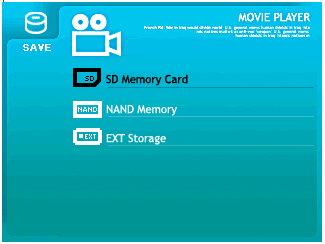

and the GP2X will display any recognized video files (.AVI). Here you can select the CPU speed, by pressing the Y button:


SAVE MODE: Select SAVE mode when playing movie file smaller than 100MB. Clock speed is 100Mhz. Recommended for files of around 320*240 resolution.

NORMAL MODE: Select normal mode when playing movie file of 100MB ~ 300MB. Clock speed is 160Mhz. For resolutions of around 320*240 to 480*320.

FULL MODE: Select full mode when playing movie file larger than 300MB. Clock speed is 200Mhz. Resolutions up to 720*480. (higher may cause slowdown)

Of course, each setting affects battery performance, since if the CPU is working at full speed, it will drain the 2 AA batteries after one hour of continuous playback. Selecting, again with the 8-way joystick, and pressing B will load up our movie. Again with Y you can access several settings, like skip/next/load etc... Pressing start goes back to the root menu.
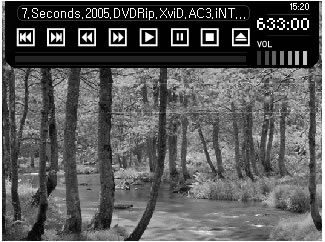
Resuming is also possible. The GP2X keeps the last exit point in its memory.


Review Pages

1. Introduction
2. Features
3. Specifications
4. Retail package
5. Design
6. Getting started
7. Video/Audio
8. Games
9. 3rd Party Software
10. Comparison with PSP
11. Conclusion


Pages

  • « first
  • ‹ previous
  • …
  • 2
  • 3
  • 4
  • 5
  • 6
  • 7
  • 8
  • 9
  • 10
  • next ›
  • last »

GP2X

Gaming

Tags: GP2X Gaming
Previous Post
Powercolour X1950Pro
Next Post
LITE-ON BD B LH-2B1S Blu-Ray Drive

Related Posts

  • The Tech Behind the Aviator Game

  • Thermaltake Announces New Shock XT 7.1 and Shock XT Gaming Headsets

  • AOC Announces the 49" AGON AG493UCX Gaming Monitor

  • Video Game Leaders to Help Consumers Make Informed Choices About Their Loot Box Purchases

  • U.S. to Overtake China as the Biggest Gaming Market

  • China Changes Rules on Game Approvals

  • Google to Hold a Gaming-Related Keynote Next Month

  • New Razer Gold and Razer Silver Launch With More Ways to be Rewarded

Latest Reviews

Why Intelligent Firmware Matters More Than Peak Throughput in NAS Systems
Enterprise & IT

Why Intelligent Firmware Matters More Than Peak Throughput in NAS Systems

Fanxiang MP83 M.2 NVMe SSD Enclosure
Enterprise & IT

Fanxiang MP83 M.2 NVMe SSD Enclosure

Ugreen CM642 USB4.0 Enclosure
PC components

Ugreen CM642 USB4.0 Enclosure

be quiet! Dark Power 14 IO
PC components

be quiet! Dark Power 14 IO

SanDisk High Endurance 512GB microSDXC
Cameras

SanDisk High Endurance 512GB microSDXC

Popular News

MSI’s Latest AMD X870E MAX & EVO Series Motherboards

MSI’s Latest AMD X870E MAX & EVO Series Motherboards

COLORFUL Launches iGame B850M ULTRA Series Micro-ATX Motherboards

COLORFUL Launches iGame B850M ULTRA Series Micro-ATX Motherboards

COLORFUL Presents Limited Edition Chitu MAG-60 Magnetic Keyboard Inspired by the Year of the Horse

COLORFUL Presents Limited Edition Chitu MAG-60 Magnetic Keyboard Inspired by the Year of the Horse

COLORFUL Launches iGame B850I MINI OC V14 Motherboard

COLORFUL Launches iGame B850I MINI OC V14 Motherboard

COLORFUL Launches the iGame X870E VULCAN W OC Motherboard

COLORFUL Launches the iGame X870E VULCAN W OC Motherboard

COLORFUL Presents iGame Z890 ULTRA-S W and iGame Z890M ULTRA Z Motherboards

COLORFUL Presents iGame Z890 ULTRA-S W and iGame Z890M ULTRA Z Motherboards

COLORFUL Expands B850 Motherboard Lineup with New CVN, Battle-Ax, and MEOW Models

COLORFUL Expands B850 Motherboard Lineup with New CVN, Battle-Ax, and MEOW Models

ASRock Adds Support for One Sub-Channel DRAM Module on Intel DDR5 Motherboards

ASRock Adds Support for One Sub-Channel DRAM Module on Intel DDR5 Motherboards

Main menu

  • Home
  • News
  • Reviews
  • Essays
  • About
    • Submit News

    • Contact Us
    • Privacy

    • Promotion
    • Advertise

    • RSS Feed
  • About
  • Privacy
  • Contact Us
  • Promotional Opportunities @ CdrInfo.com
  • Advertise on out site
  • Submit your News to our site
  • RSS Feed