Breaking News

SAMA Introduces the S32 WOOD, a Compact M-ATX Case Bundled with an 80 PLUS Gold PSU Thypoch Completes Simera-C Cine Prime Lineup with New 100mm T1.9 Lens CORSAIR Launches the RM1200e Power Supply with Built-in PinProtect GPU Overcurrent Protection and Platinum-certified Efficiency CORSAIR Changes the Game with PureVector, a Science-Based Personalized Aiming Technology, Launching Exclusively in the SABRE v3 PRO PureVector Mouse Series AMD FSR Upscaling 4.1 Boosts Frames and Image Quality on More Devices

logo

  • Share Us
    • Facebook
    • Twitter
  • Home
  • Home
  • News
  • Reviews
  • Essays
  • About
    • Submit News

    • Contact Us
    • Privacy

    • Promotion
    • Advertise

    • RSS Feed

Search form

Foxconn nT-i1200 nanoPC review

Jun 19,2012 0

3. Installing the OS


Review Pages

1. Features
2. Package, overview
3. Installing the OS
4. Basic benchmarks
5. Final words


- Bios settings

Not much to comment here as Foxconn's (American Megatrends) BIOS includes just the basic stuff. What you need to set is the 'boot device priority' option under the BIOS, in order to install Windows (or any other OS). The system came with Ver. P03 BIOS installed, which we later updated to Ver. P04 using Foxconn's Windows updater tool.

- Installing Windows

In order to install Windows 7 you can either use a USB stick or a USB optical disc with an ISO image of the OS. For our tests we used the Windows 7 32-bit Ultimate Edition OS with SP1. It is not advised to install the x64 version of Windows 7 since Intel hasn't released any compatible graphics drivers yet, although the Intel Atom 2500 processor supports x64 instructions. Of course this raises another issue; 32bit OS can only use 3GB of DDR3 memory.

After having formatted the SSD drive and finishing the tons of updates, you will eventually have your system ready. Well, not exactly.. In order to enjoy maximum performance, you'll have to install the latest drivers from Intel.

After rebooting the system you may see your desktop responding slowly. As a simple solution, disable AERO by selecting the 'basic' Windows 7 theme. It is also advised to keep choose the 'best performance' setting under the 'Visual Effects' options.

Once again we made these changes to the settings and rebooted the system. Now although the system is very responsive, you'll have to make a final change. Go to the 'Power options' and select the "High Performance".

You can also further tweak the system following the numerous guides found on Google - 'how to tweak an Intel Atom based system'.

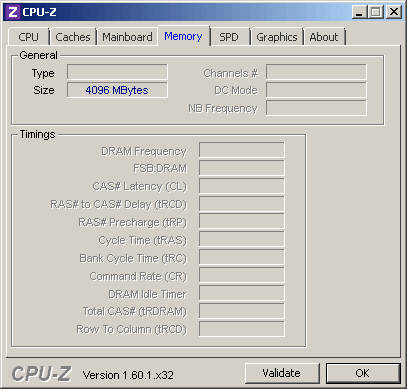
Below you see the basic information about the system and the Intel NM10 chipset. Our memory is running at 7-7-7-20-4T :

The CPI-Z utility provides more information:

Some details on the Intel 3600 IGP are provided by the GPU-Z utility:


Review Pages

1. Features
2. Package, overview
3. Installing the OS
4. Basic benchmarks
5. Final words


Pages

  • « first
  • ‹ previous
  • 1
  • 2
  • 3
  • 4
  • 5
  • next ›
  • last »

Hon Hai/Foxconn Technology Group

Tags: Hon Hai/Foxconn Technology Group
Previous Post
Pioneer BDR-2207 (BDR-207M) BDXL burner review
Next Post
OCZ 1000W Fatal1ty Series Power Supply Review

Related Posts

  • Foxconn’s Q1 Profit Influenced by Slow Smartphone Sales

  • Foxconn to Assemble Procedural Masks in Wisconsin for Pandemic Relief

  • Foxconn Says 5G IPhone Fall Launch is Feasible

  • Foxconn to Resume Production in China by End of The Month

  • Foxconn Slowly Resumes Production, Says Coronavirus Will Have am Impact to Revenue

  • Apple Stores Beijing to Reopen on February 14, Coronavirus Could Impact iPhone Production

  • China Blocks Operations of Foxconn Plants due to Coronavirus: report

  • Coronavirus Measures to Hold Back Foxconn's Production

Latest Reviews

be quiet! Light Wings Pro IO fan
Cooling Systems

be quiet! Light Wings Pro IO fan

Why Intelligent Firmware Matters More Than Peak Throughput in NAS Systems
Enterprise & IT

Why Intelligent Firmware Matters More Than Peak Throughput in NAS Systems

Fanxiang MP83 M.2 NVMe SSD Enclosure
Enterprise & IT

Fanxiang MP83 M.2 NVMe SSD Enclosure

Ugreen CM642 USB4.0 Enclosure
PC components

Ugreen CM642 USB4.0 Enclosure

be quiet! Dark Power 14 IO
PC components

be quiet! Dark Power 14 IO

Popular News

MSI’s Latest AMD X870E MAX & EVO Series Motherboards

MSI’s Latest AMD X870E MAX & EVO Series Motherboards

COLORFUL Launches iGame B850M ULTRA Series Micro-ATX Motherboards

COLORFUL Launches iGame B850M ULTRA Series Micro-ATX Motherboards

COLORFUL Presents Limited Edition Chitu MAG-60 Magnetic Keyboard Inspired by the Year of the Horse

COLORFUL Presents Limited Edition Chitu MAG-60 Magnetic Keyboard Inspired by the Year of the Horse

COLORFUL Launches iGame B850I MINI OC V14 Motherboard

COLORFUL Launches iGame B850I MINI OC V14 Motherboard

COLORFUL Launches the iGame X870E VULCAN W OC Motherboard

COLORFUL Launches the iGame X870E VULCAN W OC Motherboard

COLORFUL Presents iGame Z890 ULTRA-S W and iGame Z890M ULTRA Z Motherboards

COLORFUL Presents iGame Z890 ULTRA-S W and iGame Z890M ULTRA Z Motherboards

COLORFUL Expands B850 Motherboard Lineup with New CVN, Battle-Ax, and MEOW Models

COLORFUL Expands B850 Motherboard Lineup with New CVN, Battle-Ax, and MEOW Models

ASRock Adds Support for One Sub-Channel DRAM Module on Intel DDR5 Motherboards

ASRock Adds Support for One Sub-Channel DRAM Module on Intel DDR5 Motherboards

Main menu

  • Home
  • News
  • Reviews
  • Essays
  • About
    • Submit News

    • Contact Us
    • Privacy

    • Promotion
    • Advertise

    • RSS Feed
  • About
  • Privacy
  • Contact Us
  • Promotional Opportunities @ CdrInfo.com
  • Advertise on out site
  • Submit your News to our site
  • RSS Feed