BenQ DW800A 8x DVD+RW
2. Bundled software
Review Pages
2. Bundled software
3. Data CD Reading Tests
4. CD Error Correction Tests
5. DVD Reading Tests
6. DVD Error Correction Tests
7. Protected Data Disc Tests
8. DAE Tests
9. CD Recording Tests
10. 3T Jitter Tests
11. C1 / C2 Error Tests
12. DVD Recording Tests
13. KProbe PI/PO quality results
14. Conclusion
BenQ DW800A DVD+RW - Page 2
Bundled software
Book type defines a writing mode of a DVD+RW disc or a DVD+R disc. For example, DVD+RW discs can be burnt as either +RW or ROM types, and DVD+R discs can be burnt as either +R or ROM types.
This feature allows the user to manage the format easily between DVD+R/RW to DVD-ROM, which is the accepted standard format for the majority of DVD players.
So with the BookType v5.0 software, which is included in the retail package, the user can easily :
- Check the current writing book type of a DVD recorder
- Set the writing book type of a DVD+RW drive for DVD+RW and DVD+R discs
- Check the current book type of a DVD+R & DVD+RW disc
- Change the current media book type of a DVD+RW disc
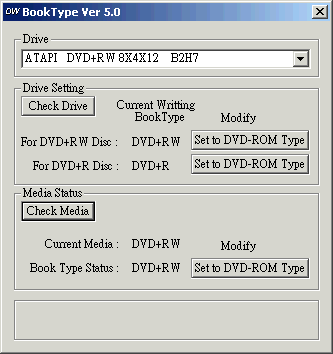
The procedure is quite simple. Below we include the main screen from the BookType v5.0 software:
 You
can see the current version of your drive by pressing the "Check Drive" button,
in the "Drive Setting" frame. It is then possible to change the current writing
book type by pressing on
either or both of the buttons under the Modify
tag. For example, on
the left we can see that
our current book type mode is set to DVD+RW and DVD+R, while it is possible,
by preesing on the buttons, to set both to DVD-ROM.
You
can see the current version of your drive by pressing the "Check Drive" button,
in the "Drive Setting" frame. It is then possible to change the current writing
book type by pressing on
either or both of the buttons under the Modify
tag. For example, on
the left we can see that
our current book type mode is set to DVD+RW and DVD+R, while it is possible,
by preesing on the buttons, to set both to DVD-ROM.
You can follow the same steps to change the book type of your written disc. Press "Check Media" to find out the current version of the inserted disc. Afterwards, change it depending on your requirements.
There are some important things that you should know before proceeding. We urge you, for your own benefit, to read the important notice at the end of this page.
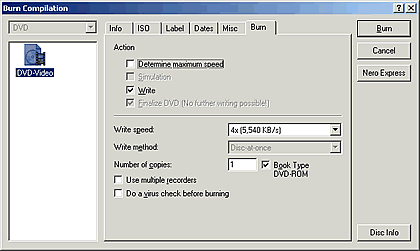
Another easy way is straight from Ahead's Nero Burning Rom programme, just before you burn your compilation; simply enable the "Book Type DVD-ROM" check box.
Summing up, the Book Type Management Tool allows the following changes to DVD+R and DVD+RW media:
Media |
BookType |
||
DVD+R |
DVD+RW |
DVD-ROM |
|
DVD+R |
OK |
NO |
OK |
DVD+RW |
NO |
OK |
OK |
IMPORTANT NOTICE
- A DVD-ROM drive only can “check” the current book
type of inserted media.
- Only DVD+RW discs can “change” book type after being burnt.
- DVD+R discs can’t change book type after burning. You have to set
the writing book type mode of your writer before you burn a DVD+R disc.
- This tool can only be used for BENQ drives (DW400A & DW800A).
- Furthermore, if your drive is the 4x DVD Writer (DW400A), this tool only
applies for firmware
version B1HY or above, while there is no limitation on the DW800A drive.
- QVideo
 This
simple software (included) allows the user to achieve real time burning from
a DV device connected to the IEEE 1394 PC input.
This
simple software (included) allows the user to achieve real time burning from
a DV device connected to the IEEE 1394 PC input.
Since backing up a DV movie onto DVD is not an easy job (there are five steps: capture-editing-authoring-rendering-burning), beginners will find this programme easy to handle, with the press of only one button. QVideo automatically detects the attached DV camera in your PC. Users just haev to press the Rec button to start video grabbing and DVD recording at once.
Review Pages
2. Bundled software
3. Data CD Reading Tests
4. CD Error Correction Tests
5. DVD Reading Tests
6. DVD Error Correction Tests
7. Protected Data Disc Tests
8. DAE Tests
9. CD Recording Tests
10. 3T Jitter Tests
11. C1 / C2 Error Tests
12. DVD Recording Tests
13. KProbe PI/PO quality results
14. Conclusion