Asus P5ND2 SLI-Deluxe
3. SLI Feature
Review Pages
2. The mainboard - Packaging
3. SLI Feature
4. Test System
5. 3DMark05
6. 3DMark03
7. Codecreatures
8. Aquamark/3DMark 2001
9. Half Life 2
10. Doom 3
11. FarCry
12. Thief 3
13. Colin McRae 2005
14. Ground Control
15. PassMark
16. Overclocking
17. Bios - Page 1
18. Bios - Page 2
19. Software - Asus Update
20. Asus PCProbe2
21. AIBooster
22. Conclusion
 With the appearance of the PCI Express x16 bus architecture, NVidia realized that the main idea of using DUAL GPUs to share the load of today's high demand graphical environments could be applied once again, with amazing results. As NVidia says: NVIDIA® SLI™ (Scalable Link Interface) technology is a revolutionary approach to scalability and increased performance. NVIDIA SLI takes advantage of the increased bandwidth of the PCI Express™ bus architecture, and features hardware and software innovations within NVIDIA GPUs (graphics processing units) and NVIDIA MCPs (media and communications processors). Together the NVIDIA SLI patent-pending technologies work seamlessly to deliver heart-pounding PC performance. And depending on the application, NVIDIA SLI can deliver as much as 2x the performance of a single GPU configuration for unparalleled gaming experiences.
First GPU |
Second GPU |
|
Final results of Scalable Link Interface (SLI™) |
|


The proportion of GPU load that will be handled by each card is controlled by the nVidia driver. However, a drawback of this technology is that the performance of the system is driver dependent. nVidia provides several gaming profiles with each new driver release to improve the performance of any SLI system.
SLI is enabled through the device driver that is provided with the retail package or from nVidia's web site .
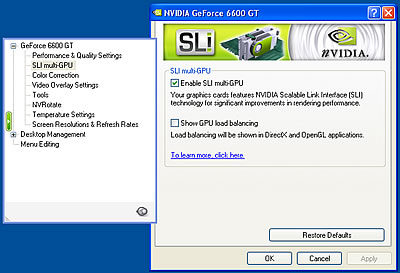
When SLI is enabled for the first time, you will see the following warning message:

At this point, you must use the primary graphics card's monitor signal.

You can also choose to monitor the GPU load for each card. This overlays a green vertical bar on your screen that changes according to the load. The snapshot below is taken under heavy load, during 3DMark05 testing.

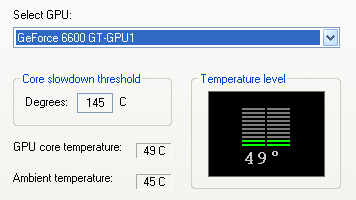
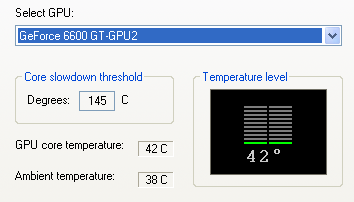
From the temperatures seen below in the two snapshots, it can been seen that each card processes a different load.
Review Pages
2. The mainboard - Packaging
3. SLI Feature
4. Test System
5. 3DMark05
6. 3DMark03
7. Codecreatures
8. Aquamark/3DMark 2001
9. Half Life 2
10. Doom 3
11. FarCry
12. Thief 3
13. Colin McRae 2005
14. Ground Control
15. PassMark
16. Overclocking
17. Bios - Page 1
18. Bios - Page 2
19. Software - Asus Update
20. Asus PCProbe2
21. AIBooster
22. Conclusion