Breaking News

Greenliant heads to electronica 2026 with its full industrial SSD lineup CORSAIR Brings Comfort in Full Bloom with Dark Cherry Blossom TC500 and TC100 RELAXED Gaming Chairs ASUS Republic of Gamers Announces Availability of ROG Swift OLED PG259QWS Ace and Strix OLED XG259QWPG Ace ASUS Announces TUF Gaming Radeon RX 9070 XT Onimusha Special Edition ASUS Republic of Gamers Announces ROG XG Station 3

logo

  • Share Us
    • Facebook
    • Twitter
  • Home
  • Home
  • News
  • Reviews
  • Essays
  • About
    • Submit News

    • Contact Us
    • Privacy

    • Promotion
    • Advertise

    • RSS Feed

Search form

Asus P5N-E SLI

Jul 17,2007 0

2. The Package


Review Pages

1. Introduction
2. The Package
3. Installation
4. Everest Ultimate Edition 2006 - SiSoft Sandra
5. PC MARK 05 - 3D MARK 06
6. Science Mark 2.0 - Pov-Ray - Nero Digital
7. Cinebench - Super Pi
8. Overclocking
9. Conclusion


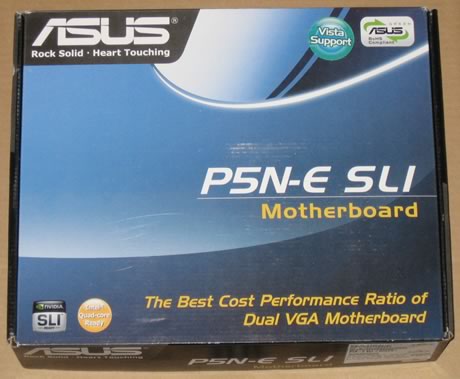
The Asus P5N-E SLI costs between €145~195, as found at several online stores. The retail package is small:
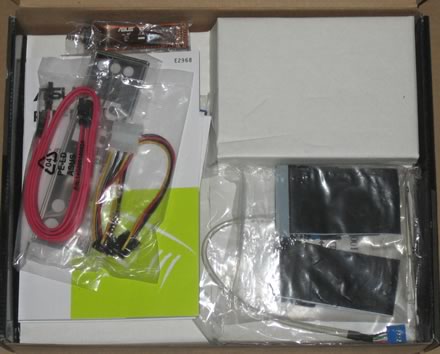
All included cables are shown below:
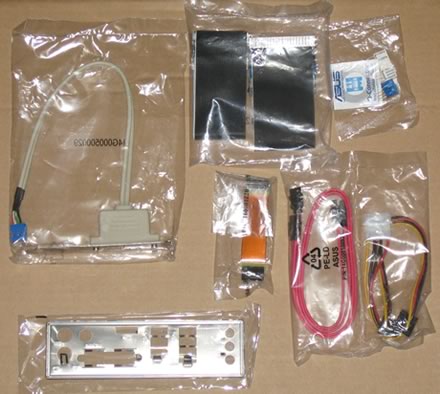
The manuals and included CDs

Below is a list of what's in the retail package

  • 1 x SLI bridge
  • 1 x 2-in-1 ASUS Q-Connector Kit (Retail version only)
  • 1 x UltraDMA 133/100/66 cable
  • 1 x FDDe cable
  • 2 x SATA cables
  • 2 x SATA power cables
  • 1 x 2-port USB2.0 module
  • 1 x I/O Shield
  • User's manual and driver CD-ROM

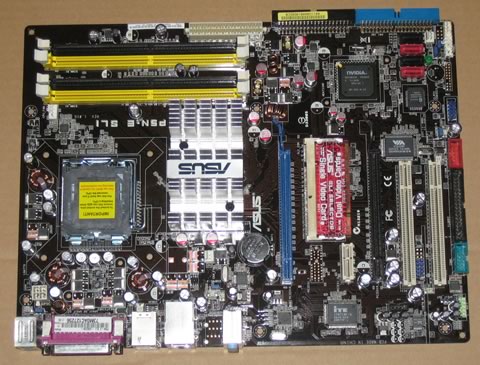
The board itself is compact but neat and all parts can be identified easily:

Let's zoom in on the CPU area.
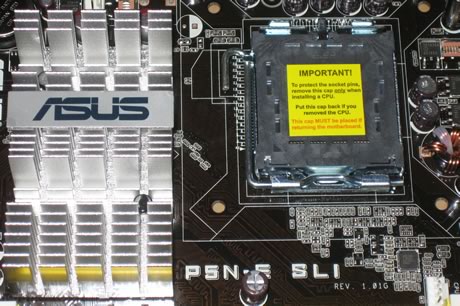
A large aluminium heatsink handles the northbridge chipset. There is plenty of free space around the CPU area and any nearby components are low profile. However, the big aluminium heatsink maybe a "problem" for 3rd party CPU coolers like the AC Freezer 7 CPU. Before purchasing such a cooler, check the compatibility list! The motherboard has four memory banks:
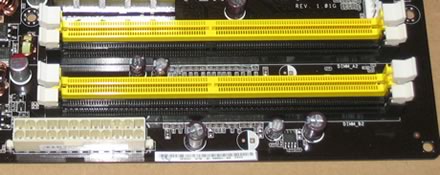
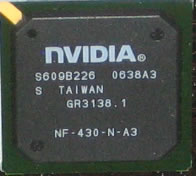
Moving to the south area on the board, we can see the 4x SATA 2 connectors and the absence of any cooling system for the southbridge chipset. It is strange that Asus has opted not to use any kind of cooling system for the chipset, possibly to try and keep the overall cost down.
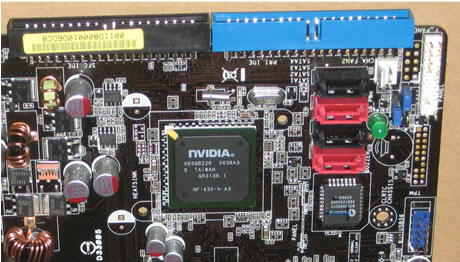
The SouthBridge needs a proper cooling system however, if you are interested in doing any overclocking.
The motherboard supports SLI Technology but in reduced mode 8x. There is enough space between the two PCI-E slots, so no problem here for extra big VGA cards:
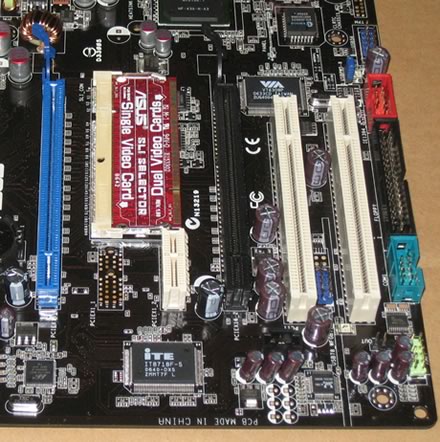
The SLI connector needs to be installed depending on the mode (one VGA card or two).

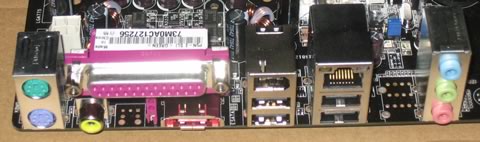
There are several extra connections for USB, Front Panel Audio, COM2 and Firewire on the back. Asus has include all port modules in the retail package. The back I/O panel has the usual connections:

  • 1 x Parallel port
  • 1 x 1394a connector
  • 1 x S/PDIF Out port (Coaxial)
  • 1 x PS/2 Keyboard port (purple)
  • 1 x PS/2 Mouse port (green)
  • 1 x LAN(RJ-45) port
  • 4 x USB 2.0/1.1 port
  • 1 x External SATA
  • 6-Channel Audio I/O port
 

Review Pages

1. Introduction
2. The Package
3. Installation
4. Everest Ultimate Edition 2006 - SiSoft Sandra
5. PC MARK 05 - 3D MARK 06
6. Science Mark 2.0 - Pov-Ray - Nero Digital
7. Cinebench - Super Pi
8. Overclocking
9. Conclusion


Pages

  • « first
  • ‹ previous
  • 1
  • 2
  • 3
  • 4
  • 5
  • 6
  • 7
  • 8
  • 9
  • next ›
  • last »

ASUS

Nvidia

Tags: ASUS Nvidia
Previous Post
OCZ ModXStream 780W
Next Post
DVD Burning, Speed vs Quality

Related Posts

  • ASUS Announces TUF Gaming Radeon RX 9070 XT Onimusha Special Edition

  • ASUS Hardware Showcase: AI Accelerators, Collector GPUs, and Esport Monitors

  • ASUS Announces ExpertBook A7 (AMD)

  • ASUS ProArt RTX Spark Windows PCs Available for Immediate Pre-Order

  • ASUS Announces New 64GB Configuration of ASUS Ascent GX10

  • Announcing the New ASUS Googlebook 14

  • ASUS Announces Ascent QN10 Mini PC

  • ASUS Announces WiFi 8 Router

Latest Reviews

The Best Online Casino Games to Play on a Browser
Enterprise & IT

The Best Online Casino Games to Play on a Browser

be quiet! Light Wings Pro IO fan
Cooling Systems

be quiet! Light Wings Pro IO fan

Why Intelligent Firmware Matters More Than Peak Throughput in NAS Systems
Enterprise & IT

Why Intelligent Firmware Matters More Than Peak Throughput in NAS Systems

Fanxiang MP83 M.2 NVMe SSD Enclosure
Enterprise & IT

Fanxiang MP83 M.2 NVMe SSD Enclosure

Ugreen CM642 USB4.0 Enclosure
PC components

Ugreen CM642 USB4.0 Enclosure

Popular News

MSI’s Latest AMD X870E MAX & EVO Series Motherboards

MSI’s Latest AMD X870E MAX & EVO Series Motherboards

COLORFUL Launches iGame B850M ULTRA Series Micro-ATX Motherboards

COLORFUL Launches iGame B850M ULTRA Series Micro-ATX Motherboards

COLORFUL Launches iGame B850I MINI OC V14 Motherboard

COLORFUL Launches iGame B850I MINI OC V14 Motherboard

COLORFUL Presents Limited Edition Chitu MAG-60 Magnetic Keyboard Inspired by the Year of the Horse

COLORFUL Presents Limited Edition Chitu MAG-60 Magnetic Keyboard Inspired by the Year of the Horse

COLORFUL Launches the iGame X870E VULCAN W OC Motherboard

COLORFUL Launches the iGame X870E VULCAN W OC Motherboard

COLORFUL Presents iGame Z890 ULTRA-S W and iGame Z890M ULTRA Z Motherboards

COLORFUL Presents iGame Z890 ULTRA-S W and iGame Z890M ULTRA Z Motherboards

COLORFUL Expands B850 Motherboard Lineup with New CVN, Battle-Ax, and MEOW Models

COLORFUL Expands B850 Motherboard Lineup with New CVN, Battle-Ax, and MEOW Models

ASRock Adds Support for One Sub-Channel DRAM Module on Intel DDR5 Motherboards

ASRock Adds Support for One Sub-Channel DRAM Module on Intel DDR5 Motherboards

Main menu

  • Home
  • News
  • Reviews
  • Essays
  • About
    • Submit News

    • Contact Us
    • Privacy

    • Promotion
    • Advertise

    • RSS Feed
  • About
  • Privacy
  • Contact Us
  • Promotional Opportunities @ CdrInfo.com
  • Advertise on out site
  • Submit your News to our site
  • RSS Feed