
Breaking News

Fanatec and Trak Racer showcase the future of simulation at SimRacing Expo Frankfurt 2026 Razer Unveils the Barracuda V2 Pro ASUS Republic of Gamers Announces Bulwark Dock DG310 Akasa Announces Fermi CM5 Fanless Case for Raspberry Pi Compute Module 5 LG Electronics Advances the LG Sound Suite Experience With New DTS

logo

  • Share Us
    • Facebook
    • Twitter
  • Home
  • Home
  • News
  • Reviews
  • Essays
  • About
    • Submit News

    • Contact Us
    • Privacy

    • Promotion
    • Advertise

    • RSS Feed

Search form

ACRyan PlayOnHD Mini review

Jul 26,2010 0

3. Powering up the player


Review Pages

1. Features
2. A closer look
3. Powering up the player
4. Network
5. Watching movies
6. Final thoughts


After having connected the power cable and and the corresponding cables to our TV ( HDMI or composite) it's time to power up the player. You can power on the player using the front power button and later turn it off using the remote control. The first step is to configure the player. The menu language and the wired lan setup are the first two steps.

The player came with r3615 firmware revision installed.
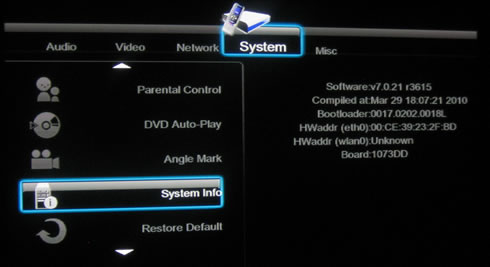
Soon we upgrade it to v4312
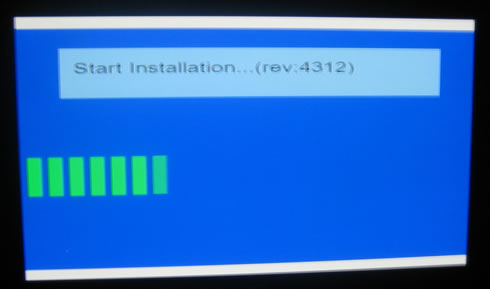
The new firmware provides an updated GUI, at least for the home page. There are many features to explore here such as the media file browser, the media library, internet feeds, p2p share and internet radio:

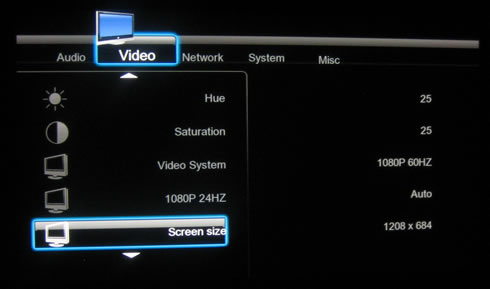
The setup menu always offer interesting information about the player's features. Here we have exactly the same layout and features as we have already saw in our PlayOnHD! review. Let's try to setup our TV system. We select the '1080p 60Hz" option and adjust the screen size:

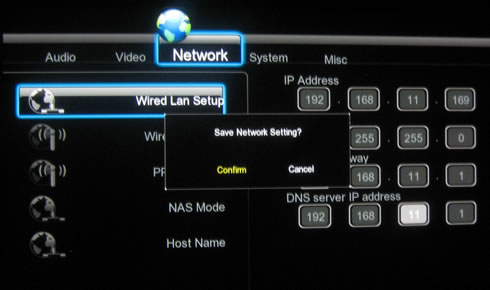
The network features are also important for our tests. We can either set them automatically or manually, we selected the later for accessing our local network.
The 'System' menu allows you to set the menu language and also the default language for the subtitles (or left to auto). AC Ryan offers two types of firmware; one for Asian and another one for the European market, in order to cover all the available languages. More info can be found here.
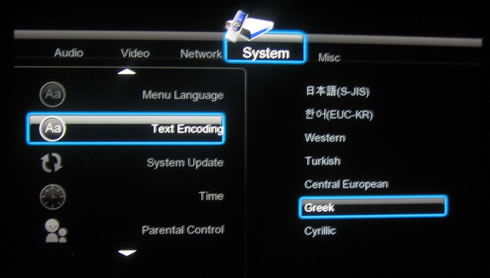
At the 'Misc' menus we will find several interesting options to play with:

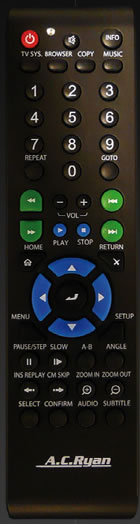
The remote control is exactly the same as the one bundled with the already tested PlayOnHD! player. While the center design (four way buttons) is nice, there are other buttons which are very small to work with, such as the play/stop buttons. It's reception seems to be good, although you have to align the control to the front of the player in order to get an immediate response.


Review Pages

1. Features
2. A closer look
3. Powering up the player
4. Network
5. Watching movies
6. Final thoughts


Pages

  • « first
  • ‹ previous
  • 1
  • 2
  • 3
  • 4
  • 5
  • 6
  • next ›
  • last »

ACRyan

Tags: ACRyan
Previous Post
Patriot Memory Inferno 100GB SSD review
Next Post
OCZ Agility2 60GB SSD review

Related Posts

  • ACRyan Veolo review

Latest Reviews

Fanxiang MP83 M.2 NVMe SSD Enclosure
Enterprise & IT

Fanxiang MP83 M.2 NVMe SSD Enclosure

Ugreen CM642 USB4.0 Enclosure
PC components

Ugreen CM642 USB4.0 Enclosure

be quiet! Dark Power 14 IO
PC components

be quiet! Dark Power 14 IO

SanDisk High Endurance 512GB microSDXC
Cameras

SanDisk High Endurance 512GB microSDXC

Samsung PRO Ultimate 512GB microSDXC
Cameras

Samsung PRO Ultimate 512GB microSDXC

Popular News

MSI’s Latest AMD X870E MAX & EVO Series Motherboards

MSI’s Latest AMD X870E MAX & EVO Series Motherboards

COLORFUL Launches iGame B850M ULTRA Series Micro-ATX Motherboards

COLORFUL Launches iGame B850M ULTRA Series Micro-ATX Motherboards

COLORFUL Presents Limited Edition Chitu MAG-60 Magnetic Keyboard Inspired by the Year of the Horse

COLORFUL Presents Limited Edition Chitu MAG-60 Magnetic Keyboard Inspired by the Year of the Horse

COLORFUL Launches iGame B850I MINI OC V14 Motherboard

COLORFUL Launches iGame B850I MINI OC V14 Motherboard

COLORFUL Launches the iGame X870E VULCAN W OC Motherboard

COLORFUL Launches the iGame X870E VULCAN W OC Motherboard

COLORFUL Presents iGame Z890 ULTRA-S W and iGame Z890M ULTRA Z Motherboards

COLORFUL Presents iGame Z890 ULTRA-S W and iGame Z890M ULTRA Z Motherboards

COLORFUL Expands B850 Motherboard Lineup with New CVN, Battle-Ax, and MEOW Models

COLORFUL Expands B850 Motherboard Lineup with New CVN, Battle-Ax, and MEOW Models

ASRock Adds Support for One Sub-Channel DRAM Module on Intel DDR5 Motherboards

ASRock Adds Support for One Sub-Channel DRAM Module on Intel DDR5 Motherboards

Main menu

  • Home
  • News
  • Reviews
  • Essays
  • About
    • Submit News

    • Contact Us
    • Privacy

    • Promotion
    • Advertise

    • RSS Feed
  • About
  • Privacy
  • Contact Us
  • Promotional Opportunities @ CdrInfo.com
  • Advertise on out site
  • Submit your News to our site
  • RSS Feed