Sanyo CRD-BP900P CD-RW
1. The buffer underrun eliminator strikes again!
Review Pages
2. Installation
3. Data Tests (Pressed CDs)
4. Data Tests (74min CDs)
5. CloneCD Tests
6. DAE Tests (Audio pressed CDs)
7. CDR Tests
8. Conclusion
Sanyo CRD-BP900P IDE CDR-W - Page 1
The buffer underrun eliminator strikes again!
 Introduction
Having already tested the SCSI model incorporating BURN-Proof technology this time we move ahead for the IDE interface. Many users wonder if they should buy IDE or SCSI CDR-W drives. In past the SCSI CDR-W drives were the only choice for professional recording since you could chain many devices and even work without the need for PC. However ,nowdays, many manufacturers (including Sanyo) present CDR-W drives for both IDE and SCSI interfaces. Also don't forget the coming ATA100 interface, which can be hooked up to 8 IDE devices! Let's see if the Sanyo CRD-BP900P IDE CDR-W drive is as good as the SCSI model (CRD-BP2) which already have been tested for our team.
History
What is this so special feature called "BURN-Proof" that the Sanyo CRD-BP900P includes? You can read the complete technology background over here but we will sum it up here for the new readers.
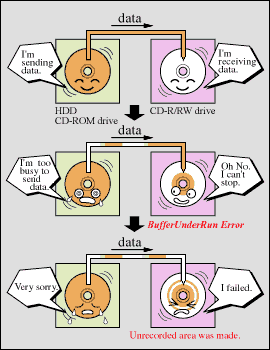 The
cause of Buffer Under Run Error
The
cause of Buffer Under Run Error
In order to make CD-DA/CD-ROM compatible discs, it is required to write
the data constantly onto the media. However, the data stream speed is not always
constant, especially when loading and running other applications while burning.
Also, your hard disk/CD-ROM could simply not be fast enough either. Furthermore,
if an unexpected error occurs in the source disc (aka read error), this will
create a Buffer Under Run error. These are the typical causes of a Buffer Under
Run Error.
Once a Buffer Under Run Error has occurred, the disc cannot be read by any CD-ROM and you will have a bad burn (aka coaster) or in the worst case, the disc will be useless (i.e. garbage). The right picture gives you an idea how the Buffer Underrun occurs (courtesy of Sanyo).
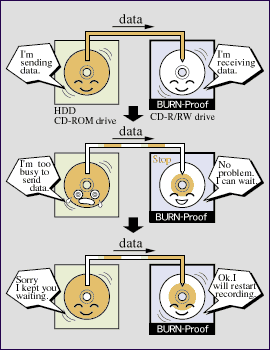 The
benefit to users of the BURN-Proof technology.
The
benefit to users of the BURN-Proof technology.
The new BURN-Proof technology now enables many CD-R/RW drives to record
data seamlessly between the end of one recorded point and the start of another
recording point, even though data transfer may be suspended due to the occurrence
of a Buffer Under Run Error. This means you can now run as many programs as
you wish and your burning will always be successful. The left picture gives
you an idea how BURN-Proof technology works (courtesy of Sanyo).
What will users benefit from BURN-Proof technology?
1) BURN-Proof technology will reduce (or eliminate) the creation of coasters.
2) BURN-Proof technology will allow users to simultaneously run many programs
while burning a CD.
3) Weak performance PCs may also be used for high-speed recording since the
actual recording speed depends only upon the data transfer rate of the PC and
the PC's performance.
Note that the BURN-Proof feature is effective
for only Buffer Under Run errors. Therefore this feature will not work for the
following cases:
1) Power outage or power cut.
2) Malfunction of the PC hardware or software crashing the entire PC.
3) Impact against the drive or inferior condition of the media.
4) Standstill of the data from the source (example: CD-ROM drive and so on)
under the abnormal condition.
The BURN-Proof feature connects the data seamlessly between the recorded point and the recording start point with high technology. The accuracy of data read is easily affected by the media condition. Therefore, in some cases of media condition, the error may occur because BURN-Proof feature cannot connect the data correctly.
Review Pages
2. Installation
3. Data Tests (Pressed CDs)
4. Data Tests (74min CDs)
5. CloneCD Tests
6. DAE Tests (Audio pressed CDs)
7. CDR Tests
8. Conclusion