Snazio NetCinema HD Player SZ1350
1. Introduction
Review Pages
2. The Package
3. Setting up the player
4. Menus
5. Firmware update
6. Video Settings/Hacks
7. Connecting with PC
8. Wireless Connection
9. The Tests - Disc compatibility
10. Playback Tests - Page 1
11. Playback Tests - Page 2
12. Playback Tests - Page 3
13. Playback Tests - Page 4
14. Playback Tests - Page 5
15. Conclusion
 Network DVD players are very common nowadays. Most users wish to "stream" multimedia content either from their PCs, or playback Mpeg4 Videos from a USB or network attached HDD player. Wireless networking also provides an alternative solution to using the various connections available. High Definition content is also being pushed into the forefront by manufacturers, as the future in visual and audio quality. Is there a desktop player that can cover all the above needs? Snazio* believes so and provided us with their latest NetCinema HD player, with the model name SZ1350. In this review, we will try to present the player's full functions and features, along with our real life tests and some extensive modifications. Note that several parts of this review are subject to change, due to the fact that frequent firmware releases can fix problems and incompatibilities. From our point of view, we will try to keep this article up to date with the latest available information.
- V One Multimedia Company Profile
 V One Multimedia was established in 1997. V One is headquartered in Singapore, with sales, marketing and support activities in USA, Taiwan, Hong Kong, China, Japan, India and Pakistan. V One has a product development team with full capabilities in R&D, manufacturing, warranty, web-based technical support and operates a speedy logistics facility to support it's worldwide expansion plan.
Using internationally endorsed MPEG technology, V One started shipping the first affordable Digital Video computing products, Snazzi* and Dazzle*, in 1997.
V One Multimedia was established in 1997. V One is headquartered in Singapore, with sales, marketing and support activities in USA, Taiwan, Hong Kong, China, Japan, India and Pakistan. V One has a product development team with full capabilities in R&D, manufacturing, warranty, web-based technical support and operates a speedy logistics facility to support it's worldwide expansion plan.
Using internationally endorsed MPEG technology, V One started shipping the first affordable Digital Video computing products, Snazzi* and Dazzle*, in 1997.
The original founder was also the original founding Chairman and CEO of Dazzle Multimedia. Leveraging on LSI (C-Cube), Broadcom, Stream Machine, Philips and Winbond technology, the product can encode video and audio into MPEG file format in real-time. V One will continue along this path and develop a wider range of products with more advanced video-encoding capabilities for both the professional and consumer markets, which will include the latest DVD, DV, AAC and MPEG-4 technology.
- Snazio* NetCinema HD Player SZ1350
Snazio*'s NetCinema SZ1350 is a network High Definition player with many connection and playback capabilities.

As Snazio* comments, you can:
- Set-up a Wi-Fi (802.11g) or LAN based Digital Home Cinema Systems to playback your digital media collections stored on your PC, Notebook, iBook or iMac systems.
- Playback your WMV9(HD), MPEG-1/2/4, DivX, DivXHD, Xvid, MOV, MP3, WMA, WMA Pro, AAC and PCM files from your remote computers and media server
- Browse your favourite photos stored on computer/ USB HDD with stunning high definition quality.
- Enjoy your growing library of music through your Home Theatre System with astounding surround sound.
- Listen or watch your favourite iPod music and photos like the way never before.
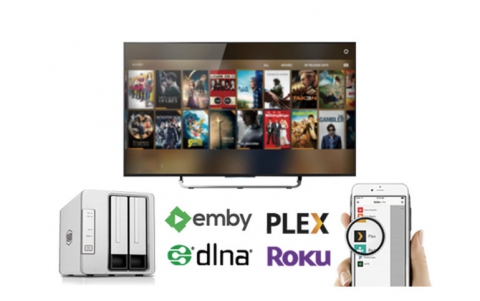
Below is an overview of how Snazio* envisages all possible uses of the SZ1350 player (click on the picture for full size image).

Below is a short listing of the main specifications for the SZ1350 player.
Model |
SZ1350 |
| DVD / VCD / Mpeg-4 Disc Playback | Yes |
| HD Video Playback | VC-1(WMV9 MP@HL), MPEG-2 MP@HL (720p/1080i), DivX HD |
| HD Video Output Resolution | Up to 720p/1080i (True High-Definition Decoding) |
| Audio WMA9 Pro | YES |
| Media Processor | Sigma Designs EM8620L |
| CPU / System Board | 166MHz 32bit RISC Processor / 8KB I-Cache / 8KB D-Cache / 64MB Data Memory / 4MB Flash |
| Video DA Converter | 12 bit / up to 148.5MHz pixel clock |
| Audio DA Converter | 24 bit / 192 Khz (5.1 Analog RCA Output) |
| USB Interface on front | USB 2.0 / 1.1 |
| Wireless | 802.11b/g (integrated) |
As we can see, the player is "powered" by the EM8620L chipset from Sigma Designs. The chipset is powerful enough to decode HD content (WMV9, Mpeg2 and DivX HD) up to 1920x1080 resolution (1080i). The upcoming EM8622L/8624L would be able to decode H264 material, as the Sigma Designs brochure unveils:


- Full specifications
Before we proceed with a description of the player, we will spend a little time looking carefully at the full specifications for the SZ1350 player. The player supports almost all currently used Video codecs (apart from WMV7, 8) and has a variety of inputs/outputs:
| AV Output | |
| Video Output | Composite Video(RCA), S-Video(Y/C), Component Video(Y Pb Pr), Digital Video Interface-Integrated (DVI-I), VGA (via optional adaptor). Support Progressive Scan |
| Video Output Signal | SCART Connector |
| Video S/N ratio: 65db Composite Video - 1.0Vpp (75Ω) , S-Video: Y : 1Vpp (75Ω) - C: 0.3Vpp (75Ω) |
|
| Audio Output | RCA x 6 Surround 5.1 |
| Audio Output Signal | Coaxial SPDIF Digital Output, Optical SPDIF Digital Output |
| Audio S/N ratio: >90db, Degree of distortion: < 0.01% Audio Stereo Output : 2Vpp , Audio Out 2.1CH: 0.5Vpp |
|
| Media Format | |
| Video Format | MPEG-1, MPEG-2, MPEG-4, DivX, Xvid, RMP4 |
| Audio Format Audio Digital / Surround Format |
MPEG-1 Layer 1 / 2 / 3 (MP3), OGG vorbis, AC3, MPEG-4 AAC (Low complexity, 5.1 channel), WMA9, PCM THX. DTS, Dolby Digital, WMA9 Pro, AC3 and Linear PCM at 16/20/24 bit with 44.1/48/96 KHz digital bit stream to SPDIF Coaxial and Optical output |
| Image Format | JPG, BMP, PNG, TIF, GIF, Animated GIF |
| Disc Format | DVD (Single/Double sides) (Single/Double layers), DVD-R/RW, DVD+R/RW, CD-RW, CD-R, VCD, DivX 4.02 or above without QPEL and GMC, MPEG-4 ISO, CD, CD-DA, MP3, WMA (8.0) or above, Picture CD |
| TV System | NTSC / PAL compatible |
| Resolutions | |
| Video Resolution | Up to 1920*1080 (1080i) |
| Multiple DVI Resolution | 480p, 720p, 1080i, 640*480, 800*600, 1024*768, 852*480 (Plasma) (p-progressive, i-interleaved) |
| Multiple Component Resolution | 480i, 480p, 720p, 1080i (60Hz); 576i, 576p, 720p, 1080i (50Hz) |
| Picture Resolution | Up to 2048*1532 |
| Connectivity | |
| Network Connection | LAN, Wi-Fi |
| Network Interface | (10BASE-T) IEEE 802.3, (100BASE-TX) IEEE 802.3u , IEEE802.11g / IEEE802.11b |
| Network Protocol | TCP/IP |
| LAN Connector | RJ-45 8 pin 10Mpbs / 100Mbps (auto sensing) |
| Wi-Fi Security | SSID (64 characters max), WEP Key (64 bit, 128 bit) (* note 2) |
| Wi-Fi Access Method | Infrastructure, Ad hoc |
| UPnP | version 1.0 |
| Windows Media Connect (WMC) | YES |
| USB Interface | Type-A Connector |
| USB device Classification | Mass Storage Classification – Fat16, Fat32, SCSI transparent command set |
| USB device | USB HDD, Thumb Drive, MP3 Player, Media Reader (CF, Micro Drive, Memory Stick (Pro), Smart Media, MMC, SD, xD) |
| Media Server Software Platform and Updates | |
| PC Windows Media Server Software | Snazzi* Net Cinema for PC Windows included |
| Mac Media Server Software | Snazzi* Net Cinema for Mac included |
| Linux Media Server Software | Snazzi* Net Cinema for Linux (contact Support) |
| Network Attached Storage (NAS) | SnaZio* Studio NAS HD Pro (with built in Net Cinema Media Server - operates as a standalone server) |
| Firmware and Software Update | Periodic Updates are available for online download by registered users |
| Basic Specifications | |
| Power Supply | AC 100V – 240V 50 / 60 Hz 15W |
| Size | 430 * 290 * 45mm (L*W*H) |
| * note 2 : WPA, WPA2 recommend to use external wireless bridge | |
Review Pages
2. The Package
3. Setting up the player
4. Menus
5. Firmware update
6. Video Settings/Hacks
7. Connecting with PC
8. Wireless Connection
9. The Tests - Disc compatibility
10. Playback Tests - Page 1
11. Playback Tests - Page 2
12. Playback Tests - Page 3
13. Playback Tests - Page 4
14. Playback Tests - Page 5
15. Conclusion