Creation USB Drive
1. Introduction
 Creation Technology, was established in 2000 with the aim of providing the most reliable and integrated solution to the constantly developing market of optical media. Recently, Creation Technology announced a new series of USB Drives with capacities up to 1GB, aiming for ultimate performance along with a low price for all users. Creation Technology kindly offered us the chance to test all their USB drive line-up in our real life tests.
- Features
According to Creation Technology, the USB drives incorporate SLC technology which enables up to 8MB/Sec reading/writing speed combined with 100K re-write cycle.

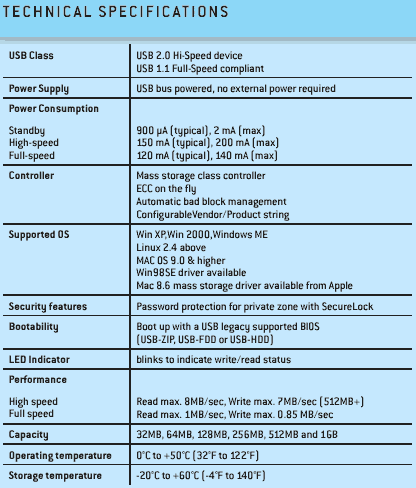
The specifications of the Creation USB drives are given below, as taken from Creation's website: