Freecom FHD2 Pro
1. Introduction
Freecom FHD-2 Pro - Page 1
 Freecom
Technologies is the leading manufacturer of portable/mobile products,
aiming to make things easier for users that want to transport their important
data anywhere. Freecom users already know the wide range of storage
solutions the company has to offer, from USB keys to optical storage devices,
such as the external 16x DVD Writer CDRInfo tested some months back.
Freecom
Technologies is the leading manufacturer of portable/mobile products,
aiming to make things easier for users that want to transport their important
data anywhere. Freecom users already know the wide range of storage
solutions the company has to offer, from USB keys to optical storage devices,
such as the external 16x DVD Writer CDRInfo tested some months back.
Their latest mobile storage solution from Freecom is the FHD series and specifically the FHD-2 Pro hard disk. It is an Ultra thin mobile 2.5" hard drive, with a durable high quality aluminum design, equipped with a "one button data synchronization" system that Freecom calls SYNC Button.
- Features
 The
Freecom FHD-2Pro is an external hard drive, that can be used to store, access
and share all your important information with the touch of a button. The main
advantages of this drive is that it does not need any AC adapter, since it
is powered by the computer's USB port and is so small, that it can fit in
your pocket. The Freecom FHD-2Pro hard drive has the following features:
The
Freecom FHD-2Pro is an external hard drive, that can be used to store, access
and share all your important information with the touch of a button. The main
advantages of this drive is that it does not need any AC adapter, since it
is powered by the computer's USB port and is so small, that it can fit in
your pocket. The Freecom FHD-2Pro hard drive has the following features:
- Mobile Hi-Speed USB2.0 hard drive in pocket size
- Compact, robust aluminum design
- Unique one touch data synchronization button
- Plug & Play, buspowered (no power adapter required)
- Very silent, due to "whisper technology"
- Available in 20, 40, 60 and 80GB version
- Meets the highest industry standards
- Compatible with USB1.1 and USB2.0 interfaces
- Ultra-compact and lightweight
- Hot swappable for maximum flexibility
- Two years manufacturers warranty
- Including award winning Acronis True Image software
- Specifications
The technical specifications of the FHD-2 Pro drive are shown below.
Freecom FHD-2 Pro |
|
| Interface | USB 2.0/1.1 |
| Power requirements | No AC adapter needed, powered by computer through USB |
| Capacity | 20, 40, 60 or 80GB (depends on model) |
| Hard drive type | 2.5" UDMA/Enhanced IDE compatible, low noise, low power consumption |
| Shock resistant | 175g, non-operating 800g |
| Average seek time | 12ms |
| Max. data transfer rate | 480Mbit/s (USB2.0) |
| Dimensions | 127 x 79 x 15mm / 5 x 3.1 x 0.59inch |
| Weight | 175 gr. / 6.17 ounce |
- The Package
 We received the 60GB version of the Freecom FHD-2 Pro drive. The retail package has all that is needed to get the drive fired up.
In the box, you will find two USB cables (a USB data cable, and a USB power cable for computers that cannot provide enough current to power the hard drive), the FHD-2 Pro, a quick installation guide, the Freecom warranty registration form, and a CD with Freecom Personal Media Suite and Acronis True Image Software.
 The
CD also includes device drivers that are only needed for Windows 98 systems.
It should be reminded that the offered software does not support the MAC OS.
The
CD also includes device drivers that are only needed for Windows 98 systems.
It should be reminded that the offered software does not support the MAC OS.
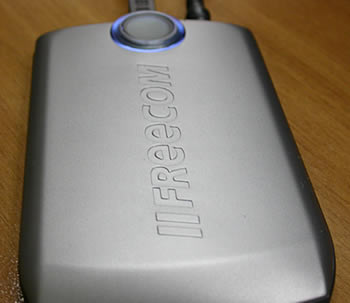
Freecom has done a great job with the design of the drive. The Freecom logo sits at the top of the drive and the blue indicator led makes it quite impressive. The whole design seems robust but with rounded edges. The SYNC Button is "surrounded" by the blue indicator led. It really looks like a small toy, so, you might want to keep small children away while the drive is working :-).

- Installation
We had no problem installing the Freecom FHD-2 Pro. However, in some systems, a second USB2.0 connection was needed to power up the device, but most new PCs will not need this. Microsoft Windows XP recognizes the device as a Toshiba MK6021GAS drive, which is in fact the 2.5" hard disk that is hidden below the Freecom cover.

By using the device manager, you can easily set the write caching and safe removal options.

In the following pages you will see the comprehensive tests that we put the Freecom FHD-2 Pro through, to investigate its performance along with a small presentation of the software included in the retail package. For the purposes of this review, we used the following software: