Windows 8 Task Manager Customized For Multi-core Systems
Ryan Haveson, a group program manager on Microsoft's User Experience team, provided an update on new Task Manager of Windows 8, which includes tools for managing systems with a large number of logical processors, typically found in servers and data centers.
The task manager of Windows 7 systems with many processors was not providing easy- -to-read, real-time comparisons. In 64+ logical processor range, the graphs were getting pretty small. In addition, if any anomalous graph was identified, there was no easy way to get the corresponding processor ID.
In the screen shots below, taken from a current build of Windows 8,
it is now easy to see all the logical processors at a glance and know
which are being utilized to high and low capacity.

New Task Manager showing 160 logical processors
In the new CPU graph, you can also get the logical processor ID that maps to each entry via a tooltip, by hovering over the entry with the mouse.

Tooltip showing the logical processor ID
A benefit of a heat map is that it scales really well to large data sets. The new Task Manager will show as many logical processors as the OS supports (up to 640). To make sure you always see the information at a meaningful size, when the data set gets too big for the window, the heat map scales to best fit, and a scroll bar appears as needed.
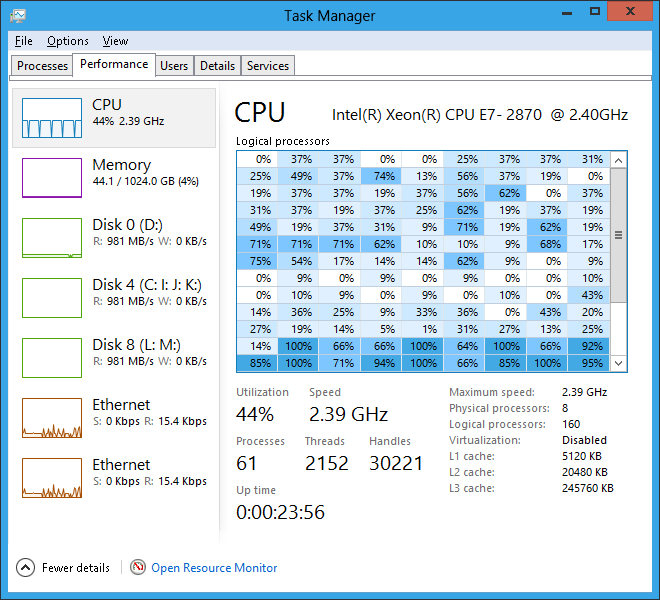
With 160 logical processors, the CPU graph scales using a scrollbar
For those of you who really like to (micro-) manage every last detail of your system, you can even set which logical processor(s) each of your processes can use. To do this, you first find the ID of the logical core by hovering over one of the cells in the heat map, then go to the Details tab, right-click the process you want, and click ?Set affinity.?
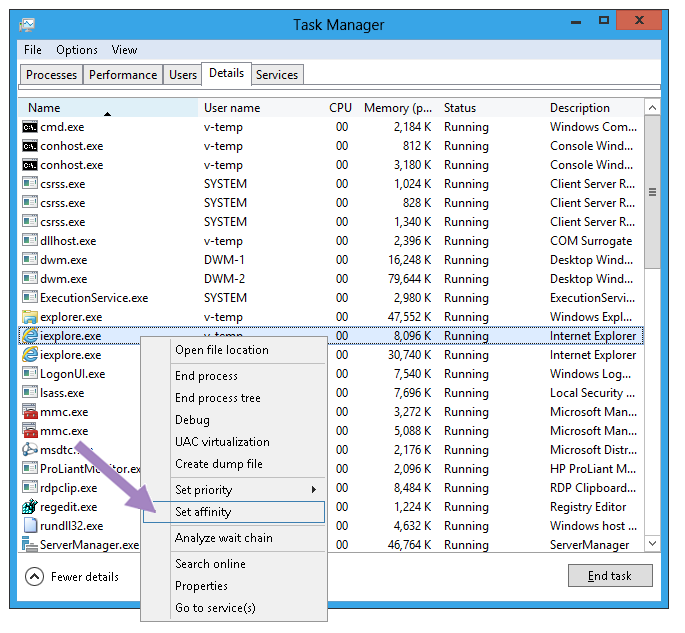
Set process affinity from the Details tab

Select the logical processors for the process
Of course, setting processor affinity is only for the super-technical user who has a need or desire for that level of control?you can severely affect your system?s power management and performance if you don?t know what you are doing?so Microsoft made sure the OS would do a great job taking care of this for you. It is hard to do better than the sophisticated algorithms that Windows uses to automatically manage which processes are allocated to each logical processor based on hardware capability and topology.