Windows 8 To Offer Improved File Management
Microsoft's Windows 8 operating system will make common Windows file management basics such as copy, move, rename, and delete easier and faster, Microsoft said.
Copying, moving, renaming, and deleting are far and away the most heavily used features within Windows Explorer, representing 50% of total command usage (based on Windows 7 telemetry data).
In Windows 8, Microsoft has three main goals for its improvements to the copy experience:
- One place to manage all copy jobs: Create one unified experience for managing and monitoring ongoing copy operations.
- Clear and concise: Remove distractions and give people the key information they need.
- User in control: Put people in control of their copy operations.
Based on these goals, Microsoft made four improvements to the copy experience.

First, Microsoft consolidated the copy experience. You can now review and control all the Explorer copy jobs currently executing in one combined UI. Windows 8 presents all pending copy jobs in this single dialog, saving you from having to navigate through multiple floating dialogs looking for the one you need.
Next, Microsoft added the ability to pause, resume, and stop each copy operation currently underway. This gives you control over which copy jobs will complete first. You can also click any of the source or destination folders while the copy operation is taking place and open up those folders.
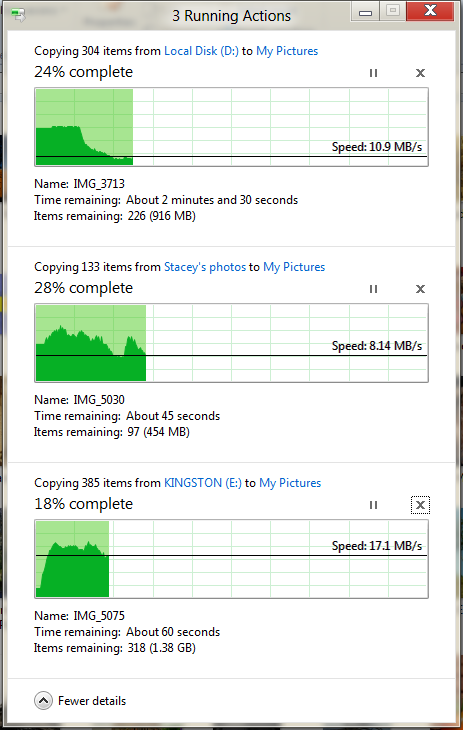
To support this new ability to prioritize and decide, Microsoft has added a detailed view with a real-time throughput graph. Now each copy job shows the speed of data transfer, the transfer rate trend, and how much data in left to transfer. While this is not designed for benchmarking, in many cases it can provide a quick way to assess what is going on for a particular job.
Here you can see three copy jobs underway:

And here you can see how the speed of file transfer increases substantially when two of the copy jobs are paused:
Microsoft added that it is nearly impossible to offer accurate estimation of the time remaining to complete a copy because there are many unpredictable and uncontrollable variables involved. For example, it depentds on how much network bandwidth will be available for the length of the copy job, whether an anti-virus software spin up and start scanning files during copying, another application need to access the hard drive or user starts a new job.

The last major set of improvements simplify and clean up the experience for resolving file name collisions, which Microsoft also refers to as "conflict resolution." At this point, people don?t know which files are which, and they find it challenging to find the information they need to make a decision.

Windows 8's new design is much more clear, concise, and efficient, providing a much more visible and actionable approach to conflict resolution. All the files from the source are on the left. All the files in the target location with file name collisions are on the right. The screen layout is easy to understand and shows you the critical information for all the collisions, front and center in one dialog.

If you need to know even more about the conflicting files, you can hover over the thumbnail image to see the file path or double-click it to open it from here.
Finally, in addition to these improvements, Microsoft has also done a thorough scrub and removed many of the confirmation dialogs that users said are annoying or feel redundant (i.e. "are you sure you want to move this file to the recycle bin?" or "are you sure you want to merge these folders?")
In Windows 8, Microsoft has three main goals for its improvements to the copy experience:
- One place to manage all copy jobs: Create one unified experience for managing and monitoring ongoing copy operations.
- Clear and concise: Remove distractions and give people the key information they need.
- User in control: Put people in control of their copy operations.
Based on these goals, Microsoft made four improvements to the copy experience.
First, Microsoft consolidated the copy experience. You can now review and control all the Explorer copy jobs currently executing in one combined UI. Windows 8 presents all pending copy jobs in this single dialog, saving you from having to navigate through multiple floating dialogs looking for the one you need.
Next, Microsoft added the ability to pause, resume, and stop each copy operation currently underway. This gives you control over which copy jobs will complete first. You can also click any of the source or destination folders while the copy operation is taking place and open up those folders.
To support this new ability to prioritize and decide, Microsoft has added a detailed view with a real-time throughput graph. Now each copy job shows the speed of data transfer, the transfer rate trend, and how much data in left to transfer. While this is not designed for benchmarking, in many cases it can provide a quick way to assess what is going on for a particular job.
Here you can see three copy jobs underway:
And here you can see how the speed of file transfer increases substantially when two of the copy jobs are paused:
Microsoft added that it is nearly impossible to offer accurate estimation of the time remaining to complete a copy because there are many unpredictable and uncontrollable variables involved. For example, it depentds on how much network bandwidth will be available for the length of the copy job, whether an anti-virus software spin up and start scanning files during copying, another application need to access the hard drive or user starts a new job.
The last major set of improvements simplify and clean up the experience for resolving file name collisions, which Microsoft also refers to as "conflict resolution." At this point, people don?t know which files are which, and they find it challenging to find the information they need to make a decision.
Windows 8's new design is much more clear, concise, and efficient, providing a much more visible and actionable approach to conflict resolution. All the files from the source are on the left. All the files in the target location with file name collisions are on the right. The screen layout is easy to understand and shows you the critical information for all the collisions, front and center in one dialog.
If you need to know even more about the conflicting files, you can hover over the thumbnail image to see the file path or double-click it to open it from here.
Finally, in addition to these improvements, Microsoft has also done a thorough scrub and removed many of the confirmation dialogs that users said are annoying or feel redundant (i.e. "are you sure you want to move this file to the recycle bin?" or "are you sure you want to merge these folders?")